An Expanded, Product-Owner–Focused Guide to Building Accessible Products and Defensible VPATs / ACRs
VPAT for eLearning platforms : An in-depth guide for Product Owners of Education & eLearning Platforms on embedding WCAG 2.2 AA into product development and producing credible VPAT / ACR documentation for ADA and Section 508 procurement.
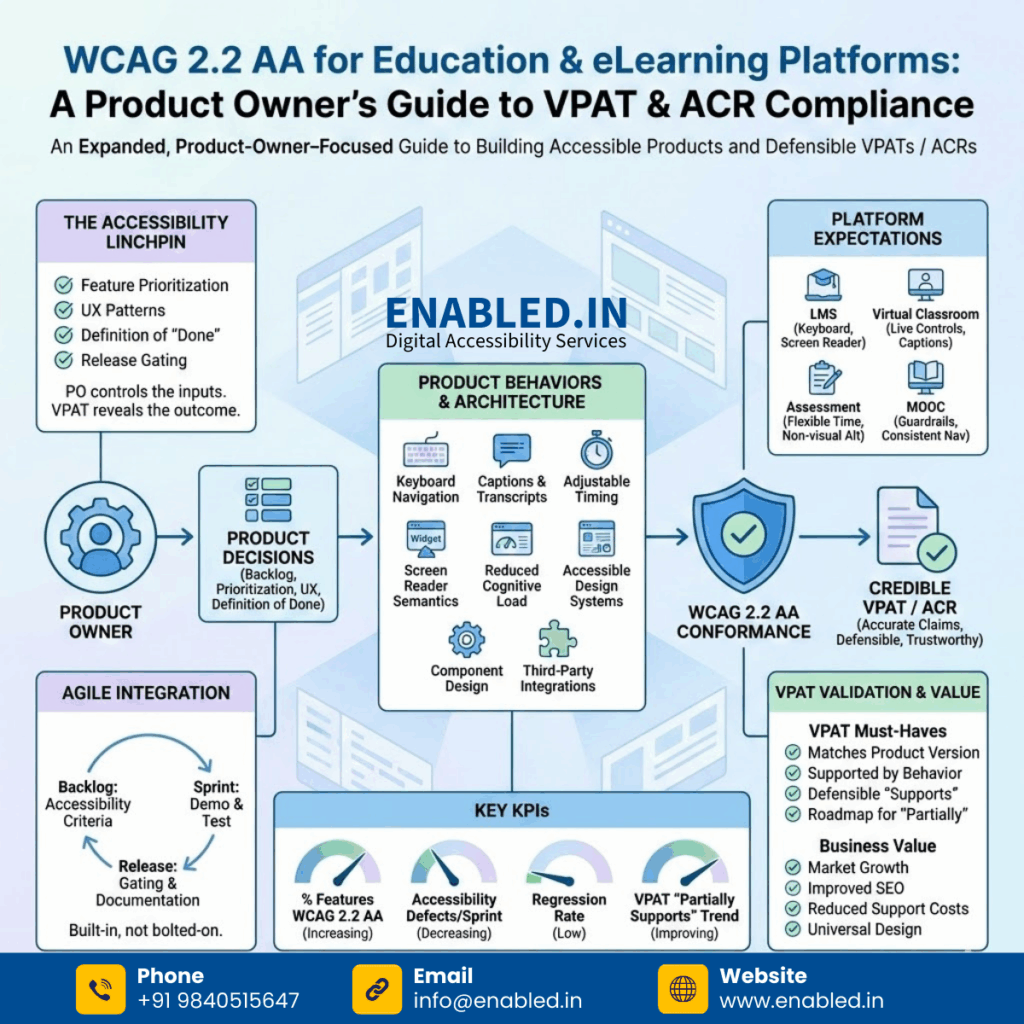
Introduction: Accessibility Lives in the Backlog
For Product Owners responsible for education and eLearning platforms, accessibility is not a policy statement or a compliance appendix, it is a product capability. Every roadmap decision, design approval, and acceptance criterion directly affects whether your platform can truthfully claim WCAG 2.2 AA conformance.
VPATs and ACRs don’t create accessibility. They expose whether accessibility was built into the product from the start. Institutions evaluating your platform will quickly see the difference.
Why Product Owners Are the Linchpin of WCAG 2.2 AA Success
Accessibility succeeds or fails at the product ownership level because Product Owners control:
- Feature prioritization and sequencing
- UX patterns and component reuse
- Definition of “done”
- Release gating criteria
When accessibility is not explicitly owned by the Product function, it becomes fragmented. Designers assume engineering will handle it. Engineering assumes compliance will document it. The VPAT reveals the truth.
WCAG 2.2 AA: Translating Guidelines into Product Decisions
WCAG 2.2 AA becomes manageable when framed as product behaviors rather than abstract criteria.
| Product Feature | WCAG 2.2 AA Impact |
|---|---|
| Custom navigation | Keyboard order, focus visibility |
| Video lectures | Captions, transcripts |
| Timed exams | Adjustable timing, error prevention |
| Interactive widgets | Screen reader semantics |
| Dense dashboards | Cognitive load reduction |
Each “Partially Supports” line in a VPAT usually traces back to one of these design choices.
How WCAG 2.2 AA Maps to Real Product Decisions
WCAG 2.2 AA connects directly to the product choices you make every day. It’s not just code; it’s design.
| Product Decision | The Accessibility Risk (What to watch for) |
|---|---|
| Custom UI components | Can you use it without a mouse? Does it work with a screen reader? |
| Time-limited exams | Are you being fair to students who need more time? |
| Drag-and-drop interactions | Is there a keyboard alternative for mobile users? |
| Dense dashboards | Is the data readable, or is it just visual clutter? |
| Video-first learning | Are captions and transcripts automatic or an afterthought? |
| Modals & Pop-ups | Does focus move into the modal and get trapped there until closed? |
If you wait until the end to think about these things, fixing them becomes expensive and fragile. Build it in now, or pay for it later.
Product Architecture Choices That Affect VPAT Outcomes
Design Systems and Component Libraries
Reusable components must be accessible by default. If your button, modal, or menu component is not keyboard- and screen-reader-friendly, every feature built on it will fail WCAG.
Product Owner action: Require accessibility sign-off on all shared components before reuse.
Third-Party Integrations
Video players, analytics tools, proctoring engines, and chat modules often introduce accessibility gaps.
VPAT reality: Customers expect your VPAT/ACR to include these components or clearly disclose exclusions.
Accessibility Expectations by Platform Type
Learning Management Systems (LMS)
- Keyboard navigation across all workflows
- Screen reader announcements for grades and feedback
- Accessible content authoring for instructors
- No loss of accessibility when uploading documents
Virtual Classrooms
- Keyboard-accessible live controls
- Captioning integration (CART or equivalent)
- Predictable focus management during live updates
- Accessible breakout rooms and polls
Virtual classrooms are among the highest-risk products in VPAT reviews.
Assessment & Exam Platforms
- Flexible time limits and accommodations
- Non-visual alternatives to drag-and-drop
- Clear instructions announced to assistive technologies
- Color-independent feedback and scoring
Most accessibility complaints in education involve assessments.
MOOC Platforms
- Accessibility guardrails for content creators
- Mandatory captions or transcript workflows
- Accessible discussion forums
- Consistent navigation across courses
Scale amplifies both good and bad accessibility decisions.
Building Accessibility into Agile Product Development
Backlog & User Stories
Every relevant user story should include accessibility acceptance criteria:
- “Works with keyboard only”
- “Announced correctly by screen readers”
- “Meets contrast and resize requirements”
Sprint Reviews
Accessibility should be demoed not assumed:
- Navigate using keyboard only
- Verify focus order visually
- Test with at least one screen reader
Release Readiness
Accessibility should be a release gate, not a follow-up task. Known issues should be documented not hidden.
From Product Reality to VPAT / ACR Accuracy
What Product Owners Must Validate Before VPAT Publication
- The VPAT matches the exact product version
- Claims are supported by real behavior
- “Supports” entries are defensible
- “Partially Supports” entries include roadmap commitments
A VPAT overstating conformance damages trust more than admitting gaps.
Working with Legal, Sales, and Compliance Teams
Product Owners should:
- Review VPAT drafts for technical accuracy
- Reject unsupported claims
- Align accessibility roadmap items with customer procurement feedback
- Treat VPAT updates as part of release planning
Accessibility documentation without product ownership creates liability.
KPIs Product Owners Should Track for Accessibility
- % of features meeting WCAG 2.2 AA at release
- Accessibility defects per sprint
- Regression rates across releases
- VPAT “Partially Supports” trend over time
Accessibility maturity is measurable.
Selling Accessibility to Stakeholders
Sometimes the hardest part is convincing the business to invest in accessibility. Here is your ammo:
- It’s Market Growth: 15% of the global population experiences some form of disability. Ignoring them is ignoring a massive user base.
- It Improves SEO: Accessibility best practices (semantic HTML, alt text, captions) directly boost your Google rankings.
- It Reduces Support Costs: Clear labels and intuitive navigation mean fewer confused users emailing support.
- Universal Design: Features built for accessibility (like captions) often help all users (students watching in loud cafes).
Frequently Asked Questions (FAQ): WCAG 2.2 AA, VPAT, and ACR for Education & eLearning Product Owners
What is WCAG 2.2 AA and why does it matter for education and eLearning platforms?
WCAG 2.2 AA is the most current, widely accepted accessibility standard used to evaluate digital platforms. For education and eLearning products, it ensures that students, instructors, and employees with disabilities can fully access learning content, assessments, and workflows. For Product Owners, WCAG 2.2 AA is the technical foundation used by customers to assess ADA and Section 508 compliance during procurement.
Is WCAG 2.2 AA legally required in the United States?
WCAG 2.2 AA itself is not a law. However, it is the standard regulators, courts, and procurement teams rely on to determine compliance with ADA Title I, Title II, Title III, and Section 508. In practice, WCAG 2.2 AA is the safest benchmark for new education platforms.
Who is responsible for accessibility compliance in an education product—Product or Compliance teams?
Accessibility is a product responsibility. Compliance teams document accessibility, but Product Owners determine features, UX patterns, acceptance criteria, release readiness, and technical feasibility. If accessibility is not built into the product, the VPAT or ACR will expose that gap.
What is a VPAT and how is it used in education procurement?
A VPAT (Voluntary Product Accessibility Template) is a standardized document used by vendors to explain how their product conforms to accessibility standards such as WCAG 2.2 AA and Section 508. Procurement teams use VPATs to evaluate accessibility risk, compare vendors, and support legally defensible purchasing decisions.
What is an Accessibility Conformance Report (ACR)?
An Accessibility Conformance Report (ACR) is the completed version of a VPAT for a specific product and version. It documents which WCAG 2.2 AA criteria are supported, known limitations or gaps, and the testing methods and assistive technologies used.
Is a VPAT or ACR the same as an accessibility certification?
No. VPATs and ACRs are self-disclosure documents, not certifications. They do not guarantee compliance, and inaccurate or misleading reports can create legal and reputational risk.
When should Product Owners be involved in VPAT or ACR creation?
Product Owners should be involved before testing begins, during interpretation of WCAG criteria, when reviewing “Supports” or “Partially Supports” claims, and before final publication. A VPAT approved without Product validation is a liability.
What does “Partially Supports” mean in a VPAT—and is it acceptable?
“Partially Supports” means a product meets a WCAG criterion in some situations but not all. It is acceptable only when limitations, user impact, and remediation or workaround plans are clearly documented.
What accessibility areas most often fail in eLearning platforms?
Common problem areas include keyboard navigation in assessments, screen reader access to dashboards and gradebooks, live virtual classroom controls, video captions and transcripts, drag-and-drop interactions without alternatives, and fixed time limits in exams.
Are internal corporate LMS platforms covered under accessibility laws?
Yes. Corporate LMS and training platforms are covered under ADA Title I when used by employees. Internal use does not exempt a platform from accessibility obligations.
Do third-party tools need to be included in VPATs and ACRs?
Yes. Third-party tools such as video players, exam proctoring systems, analytics dashboards, and chat modules must be included or explicitly disclosed as exceptions.
Can a vendor exclude inaccessible features from a VPAT?
Only if exclusions are clearly documented. Hidden exclusions undermine trust and may disqualify a product during procurement.
Should Product Owners plan for third-party accessibility audits?
Yes. Third-party audits strengthen VPAT credibility, reduce legal risk, identify issues early, and support enterprise and public-sector sales.
How often should VPATs and ACRs be updated?
VPATs and ACRs should be updated after major releases, significant UI or workflow changes, and at least annually for long-term contracts.
Does WCAG 2.2 AA apply to mobile learning apps?
Yes. WCAG applies to both web and mobile interfaces, including iOS and Android apps used for education and training.
How should Product Owners embed accessibility into Agile development?
Product Owners should include accessibility acceptance criteria in user stories, test with keyboard and screen readers during sprints, treat accessibility as a release gate, and track accessibility defects like security issues.
What KPIs should Product Owners track for accessibility?
Key metrics include WCAG 2.2 AA compliance at release, accessibility defects per sprint, regression rates, and the number of “Partially Supports” entries in VPATs over time.
Can accessibility be fixed after launch?
Yes, but post-launch accessibility remediation is expensive, disruptive, and risky. Building accessibility correctly from the start is significantly more efficient.
Why are exam portals and assessments high-risk for accessibility?
Exam portals often involve time limits, complex interactions, and high-stakes outcomes. Accessibility failures in assessments frequently lead to complaints, investigations, and litigation.
What is the biggest mistake Product Owners make with VPATs and accessibility?
The biggest mistake is treating accessibility as documentation, a last-minute audit, or someone else’s responsibility. Accessibility is a core product quality attribute.
Contact Enabled.in
If you are responsible for digital products, compliance, or risk management in U.S. banking or eLearning/Education services, connect with Enabled.in:
Need a VPAT for a Education App Accessibility?
Explore Education / eLearning Website / Mobile App ADA 508 Accessibility Audit & VPAT Services
Talk to Our Accessibility Experts
We’re here to help. You might be responding to an RFP. You’re preparing for procurement. Or you could be improving inclusion across your Booking web and mobile app platform.
Contact us today to discuss your ELearning Web & Mobile App accessibility audit. Let’s talk about your VPAT requirements. Take the next step toward inclusive, compliant finance systems.
Sathasivam Kannupayan
sathasivam@enabled.in
www.enabled.in
+91 98405 15647