Introduction: Accessibility Is About People, Not Just Regulations
VPAT for mobile app – Mobile apps are where real life happens. Employees apply for jobs on them. Students learn from them. Customers bank, shop, stream, and connect through them. For SaaS companies, government agencies, fintech platforms, and education providers, mobile apps are no longer optional they are mission-critical.
That’s exactly why accessibility laws have become stricter and clearer.
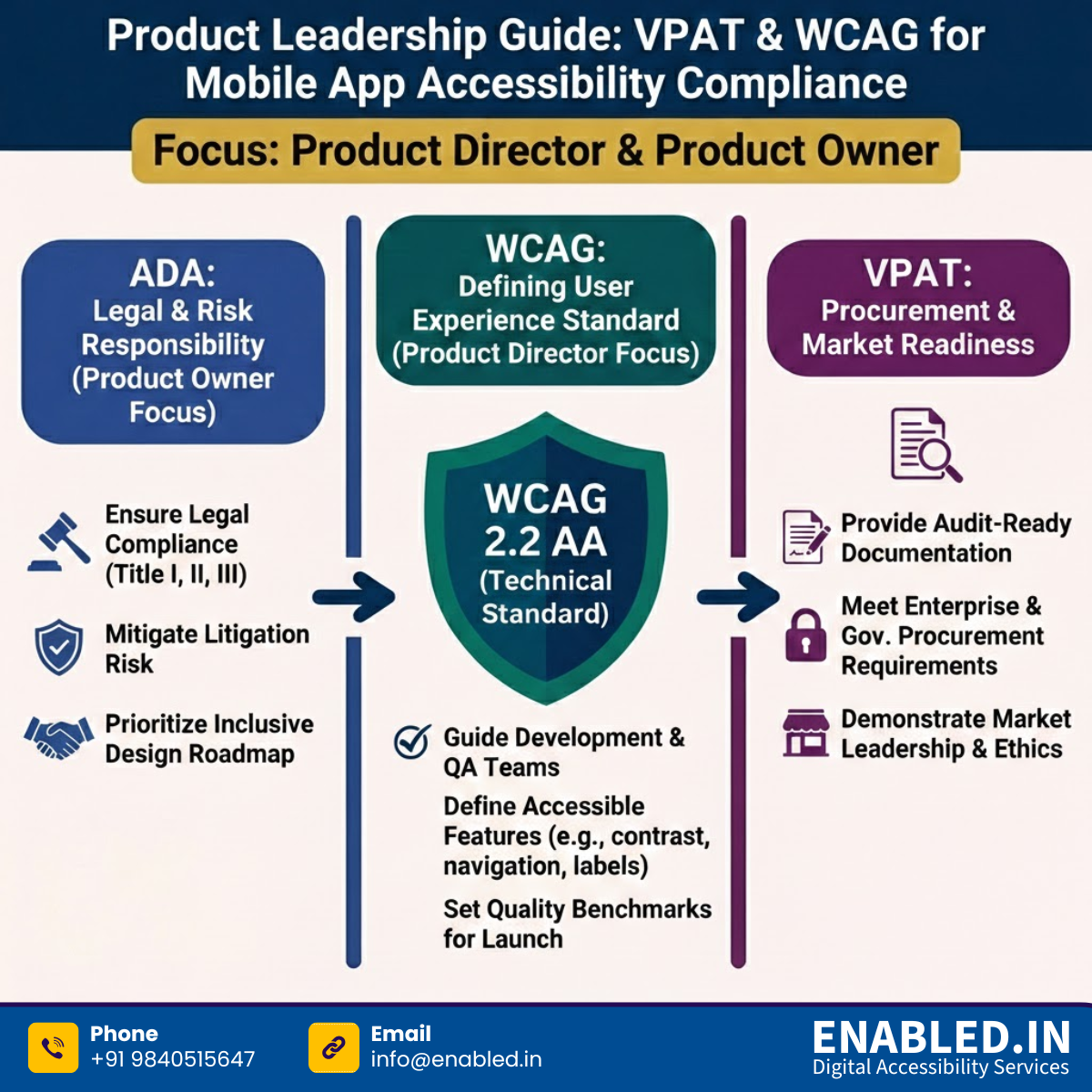
In the U.S., ADA Title I, II, and III now explicitly apply to digital experiences, including mobile applications. In parallel, WCAG (Web Content Accessibility Guidelines) have become essential tools. Additionally, VPAT documentation helps organizations prove compliance.
This article breaks it all down without legal jargon overload. This way, Product Owners, QA teams, Developers, and Compliance leaders can understand what’s required. They will see why it matters and how to do it right.
Long Description: VPAT for Ticket Booking & Transport Apps
This infographic provides a strategic overview of digital accessibility compliance for transport and booking platforms, tailored for Product Directors and Owners.
1. Central Compliance Core
- VPAT Compliance Shield: Central icon representing standardized reporting.
- Regulatory Standards: Highlights WCAG 2.1 / 2.2 AA, ADA Titles I, II, III, and Section 508 (Federal Procurement).
- Procurement Flow: Shows Web Portals and Mobile Apps feeding into a government “APPROVED” procurement seal.
2. Four Focus Areas for Product Owners
- Booking Websites: Focuses on travel portals, route planners, end-to-end workflows, and accessible web forms.
- Mobile Applications: Focuses on transit apps and QR scanning. Key technical needs include iOS/Android screen reader support (VoiceOver/TalkBack), logical focus order, and gesture alternatives.
- Real-Time Tools: Focuses on live arrival boards and delay alerts, emphasizing time-sensitive content accessibility and audio notifications.
- Insurance & Claims: Focuses on refund portals and claim forms, requiring multi-step form accessibility and screen-reader compatible digital documents (PDFs).
3. Organization & Contact Info
Provider: Enabled.in — Supports Procurement-Ready VPATs.
Contact: Sathasivam Kannupayan | sathasivam@enabled.in | +91 98405 15647
What Does “Mobile App Accessibility Compliance” Really Mean?
Accessibility means your mobile app can be used by people with:
- Visual impairments
- Hearing loss
- Mobility limitations
- Cognitive or neurological differences
Accessibility offers various features. These include screen readers, voice control, keyboard navigation, and readable layouts. It ensures that essential digital services are accessible to everyone.
For organizations operating in the U.S. and Europe, accessibility is not just best practice it’s a legal obligation.
How ADA Title I, II, and III Apply to Mobile Apps
ADA Title I – Employment-Related Mobile Apps
If your mobile app is used for:
- Job applications
- Internal HR systems
- Benefits enrollment
- Required employee training
…it must be accessible. Title I protects applicants and employees from digital discrimination, just like physical workplace barriers.
ADA Title II – Government & Public Education Apps
Title II applies to:
- State and local government agencies
- Public universities and schools
- Public transportation, utilities, and civic services
This includes public-facing apps and internal systems used by government employees when tied to work, training, or benefits. Importantly, ADA Title II also applies to U.S. territories, not just the 50 states.
ADA Title III – Consumer-Facing Mobile Apps
Title III covers private businesses offering goods or services to the public. Courts increasingly recognize mobile apps as digital places of public accommodation, including:
- SaaS platforms
- Fintech and mobile banking apps
- eCommerce and subscription apps
- Ticketing and streaming services
If users rely on your app, accessibility is expected.
Why WCAG Is the Foundation for Mobile App Accessibility
The ADA tells you what must be accessible but not how. That’s where WCAG comes in.
Why WCAG 2.2 AA Is the Preferred Standard
WCAG 2.2 AA is widely accepted because it:
- Aligns with ADA Title I, II, and III expectations
- Supports Section 508 requirements
- Is recognized by courts and regulators
- Applies cleanly to mobile interfaces
It focuses on real mobile usability issues like:
- Touch target size
- Visible focus indicators
- Error prevention
- Consistent navigation
- Cognitive accessibility
In short, WCAG 2.2 AA makes apps usable in the real world not just compliant on paper.
What Is a VPAT and Why Mobile Apps Need One
A VPAT (Voluntary Product Accessibility Template) is a standardized document that explains how accessible your mobile app actually is.
Think of it as:
- A transparency report for accessibility
- A procurement requirement
- A legal safety net
Why VPAT Is Critical for Mobile Apps
1. Required for Government & Public-Sector Sales
If you sell your app to:
- Federal agencies
- State or local governments
- Public schools or universities
a VPAT is almost always mandatory.
2. Increasingly Required by Enterprises
Even private companies now demand VPATs from vendors to reduce legal and reputational risk.
3. Proof of ADA Due Diligence
While ADA doesn’t explicitly say “you must have a VPAT,” enforcement actions expect documentation. A VPAT shows:
- You evaluated accessibility
- You followed WCAG
- You understand your gaps
That matters in audits and legal challenges.
4. Supports “Certify Once, Comply Everywhere”
A WCAG-based VPAT can be reused across:
- ADA Title I, II, and III
- Section 508
- Many state and international accessibility laws
Accessibility Responsibilities by Role
For Product Owners
- Build accessibility into requirements, not retrofits
- Treat accessibility like security or performance
For Developers
- Use native Android and iOS accessibility APIs
- Ensure semantic structure, focus order, and labels
For QA Teams
- Test with screen readers, keyboards, voice input
- Validate real user flows, not just static screens
For Compliance Teams
- Maintain VPATs and accessibility documentation
- Track updates and third-party risks
Accessibility works best when everyone owns a piece of it.
Mobile App Types That Must Be Accessible
- SaaS mobile platforms
- Fintech and mobile payment apps
- Government service apps
- Educational and e-learning apps
- Streaming and media apps
- Ticketing and travel apps
If people rely on your app to live, work, learn, or pay—you’re in scope.
A Simple, Sustainable Compliance Approach
- Audit your mobile app against WCAG 2.2 AA
- Fix issues in design, code, and content
- Test with assistive technologies and real users
- Create a VPAT that reflects reality
- Monitor continuously as your app evolves
Accessibility is not a one-time checkbox it’s part of product quality.
FAQs: What Teams Ask Most Often
Are mobile apps legally required to be accessible?
Yes. Courts and regulators increasingly treat mobile applications as covered under ADA Titles II and III, making accessibility a legal requirement.
Is WCAG 2.2 AA mandatory for ADA compliance?
While WCAG 2.2 AA is not explicitly written into the ADA, it is the most widely accepted technical standard used in enforcement actions, settlements, and litigation.
Does ADA Title I apply to internal employee mobile apps?
Yes. Employment-related mobile applications used for hiring, onboarding, training, benefits, or daily job functions must be accessible under ADA Title I.
Can one accessibility effort cover multiple laws?
Yes. Conforming to WCAG 2.2 AA supports ADA compliance, Section 508 requirements, and many U.S. state accessibility laws.
How often should mobile apps be tested for accessibility?
Accessibility testing should be conducted at every major update and at least annually to ensure continued compliance.
What happens if accessibility is ignored?
Organizations risk ADA lawsuits, financial penalties, loss of government or enterprise contracts, and reputational damage.
What do the new ADA Title I, II, and III rules cover?
The rules explicitly confirm that websites, mobile apps, digital portals, and electronic documents are covered alongside physical spaces.
Do internal government systems need to be accessible?
Yes. Internal government systems related to employment, benefits, training, or required job functions must be accessible.
Does ADA Title II apply to U.S. territories?
Yes. ADA Title II applies fully to U.S. territories and possessions.
Do compliance deadlines vary by city size?
In some cases, larger cities are expected to comply sooner, but accessibility compliance is mandatory for all jurisdictions.
How do accessibility deadlines work for schools and universities?
New digital systems must be accessible immediately, while timelines for existing systems depend on impact, usage, and scale.
What accessibility standards should organizations follow?
WCAG 2.2 AA is the recognized technical standard supporting ADA compliance and Section 508 requirements.
Must court and legal documents be accessible?
Yes. Public-facing court documents must be searchable, screen-reader compatible, and accessible to users with disabilities.
Are images and videos covered under ADA accessibility?
Yes. Images require meaningful alternative text, and videos must include captions and, when necessary, audio descriptions.
Who is responsible for accessibility when using third-party vendors?
The organization offering the service remains legally responsible for accessibility, even when third-party vendors or platforms are used.
How Enabled.in Helps Teams Get Accessibility Right
Accessibility doesn’t have to slow your roadmap.
Enabled.in helps organizations across SaaS, government, fintech, and education make mobile apps accessible practically and defensibly.
How Enabled.in Supports You
- Mobile app accessibility audits (Android & iOS)
- WCAG 2.2 AA remediation guidance
- ADA Title I, II, and III compliance support
- Section 508 alignment
- VPAT creation and validation
- Ongoing monitoring as apps evolve
Their Certify Once, Comply Everywhere approach helps teams launch faster while reducing compliance risk.
Learn more here: https://enabled.in/ada-title-ii-digital-accessibility-compliance-wcag-2-2-aa-section-508-vpat/
Final Thoughts: Accessibility Is Just Good Product Design
VPAT and WCAG compliance for mobile apps isn’t about fear of lawsuits. It’s about building products that work for real people. Designing for accessibility improves usability. It expands your audience. It also protects your organization across ADA Title I, II, and III.
Accessible apps aren’t slower to build. They’re better built.
Takeaway for Procurement Teams
If a digital product supports ticket booking, transport services, real-time travel information, or insurance and claims, it falls within the scope of ADA Titles II & III and Section 508.
A VPAT is the official, standardized proof of accessibility compliance required for procurement decisions.
Need a VPAT for a Mobile App Accessibility?
Explore Mobile App ADA 508 Accessibility Audit & VPAT Services
Talk to Our Accessibility Experts
Whether you’re responding to an RFP, preparing for procurement, or improving inclusion across your Booking web and mobile app platform, we’re here to help.
Contact us today to discuss your Mobile App accessibility audit and VPAT requirements and take the next step toward inclusive, compliant ticket systems.
Sathasivam Kannupayan
sathasivam@enabled.in
www.enabled.in
+91 98405 15647