WCAG 3.0 Explained: A Practical Guide for Everyone
A section-oriented explanation of the current W3C Accessibility Guidelines (WCAG) 3.0 Working Draft: what it is, how it is organised, what is changing, and how organisations can prepare responsibly.
Prepared against the W3C Working Draft published 10 September 2026. WCAG 3.0 is still a draft and may change.
1. What is WCAG 3.0?
WCAG 3.0 is the next-generation accessibility framework being developed by the W3C Accessibility Guidelines Working Group. It is designed to address a wide range of user needs and digital experiences, including websites, applications, dynamic content, streaming media, virtual and augmented reality, wearable devices and other connected experiences.
The current draft focuses on functional needs: what a person needs to be able to do, perceive, understand or control. It then organises accessibility guidance into guidelines, requirements, assertions and technology-specific methods.
2. How to read the current draft
The W3C publication is a Working Draft. It includes requirements that have reached the Developing status. Some content is still being refined, and the final set of requirements may be added to, combined, removed or rewritten.
Temporary content
Illustrates the type of material expected later. It is not ready for adoption.
Direction under review
Concepts and definitions may be incomplete. Feedback is about the proposed direction.
Broad agreement
The topic is roughly agreed, but details and implementation questions remain.
Wide review
Ready for broader public review and experimental adoption.
Near recommendation
Believed to be ready for recommendation, subject to edge cases and final review.
Do not describe a draft requirement as a current legal obligation unless the applicable law, regulation, contract or procurement rule explicitly requires it.
3. The WCAG 3.0 structure
| Layer | What it means | Practical question |
|---|---|---|
| Functional needs | The needs of people using digital content with disabilities. | What must a person be able to do? |
| Guidelines | Broad accessibility goals, such as accessible media or clear structure. | Which area of accessibility is involved? |
| Requirements | More specific statements that support a guideline. | What condition should be met? |
| Assertions | Evidence or declarations used to support conformance reporting. | What can the organisation demonstrate? |
| Methods | Technology-specific ways to meet a requirement or assertion. | How can the team implement and test it? |
This model is more granular than the WCAG 2 success-criteria model. It is intended to support evolving technologies and different types of evidence, while keeping the focus on accessibility outcomes.
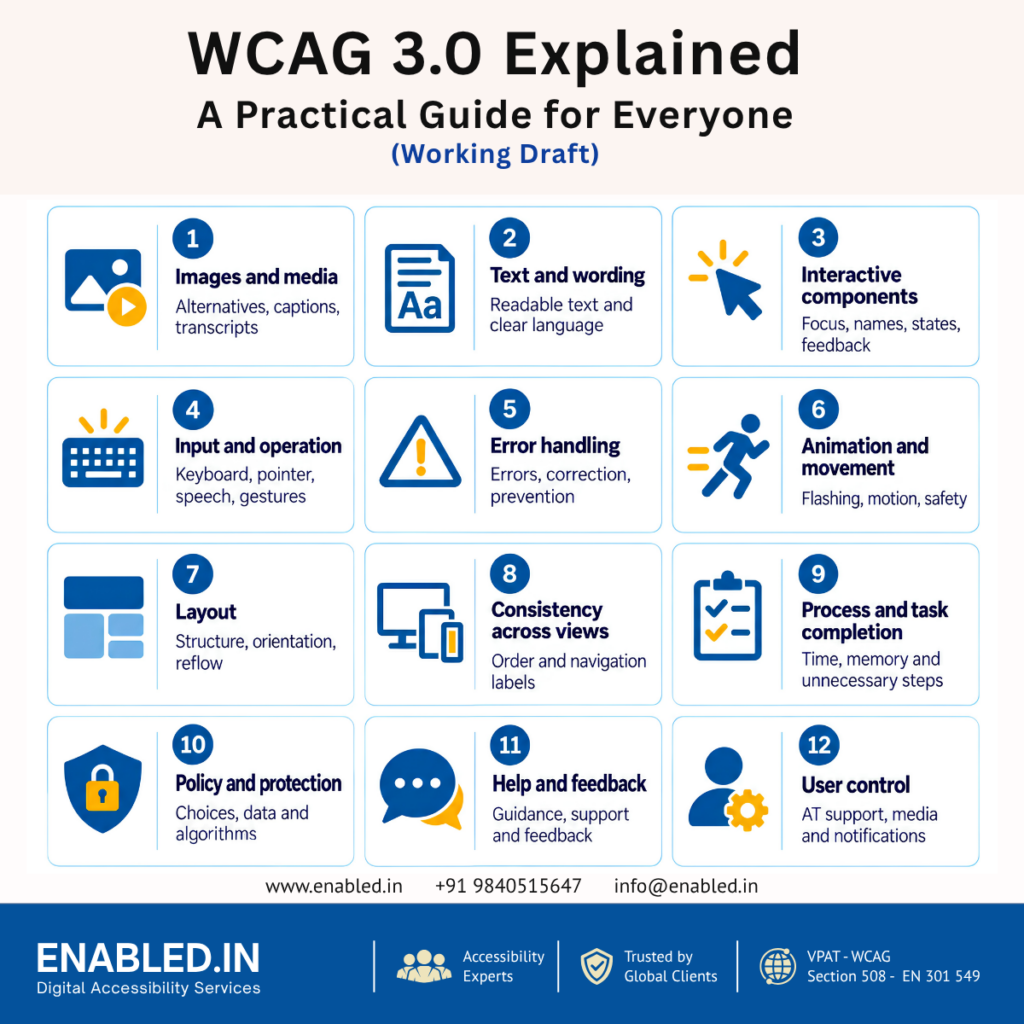
4. WCAG 3.0 guidelines at a glance
The draft currently groups its guidance into twelve broad areas. The list and wording may change as the draft develops.
2.1 Images and media
Image alternatives, captions, transcripts, audio description, sign language, single-sense access and accessible media players.
2.2 Text and wording
Readable text, adjustable presentation, text-to-speech support and clear language.
2.3 Interactive components
Visible focus, pointer feedback, predictable behaviour, names, states, values and input constraints.
2.4 Input and operation
Keyboard, pointer, speech, real-time text, hover, gestures, body movement, eye tracking and authentication.
2.5 Error handling
Error notification, correction, suggestions, prevention, validation and submission status.
2.6 Animation and movement
Flashing, motion, haptic feedback, audio shifting, warnings and safe-content review.
2.7 Layout
Recognisable layouts, orientation, headings, relationships, content blocks and unobstructed content.
2.8 Consistency across views
Consistent structural order, navigation order and navigation labels.
2.9 Process and task completion
Non-exclusionary tasks, adequate time, deception avoidance, retained information and necessary steps.
2.10 Policy and protection
Consequences of choices, diverse disability considerations, inclusive data and algorithmic harm.
2.11 Help and feedback
Consistent and contextual help, explanations, supported decision-making and feedback mechanisms.
2.12 User control
Assistive technology support, user settings, viewport, media controls and notifications of content changes.
How to use this list
Use the guideline names as a planning map, not as a replacement for testing. A complete assessment still needs relevant requirements, applicable methods, user journeys, assistive technology coverage and evidence. The draft also distinguishes core requirements, supplemental requirements and assertions; their classification matters when planning a conformance claim.
5. Conformance in WCAG 3.0
The current draft contains conformance requirements covering accessibility support and a defined conformance scope. It also explains how normative provisions should be interpreted and distinguishes requirements from recommended practices.
Accessibility support
A product should be evaluated in the accessibility-supported environment relevant to the claim. This means considering the technology, user agent, assistive technology and configuration needed for people to use the content.
Defined scope
A conformance claim needs a clear scope. State which product, pages, flows, content types, versions, platforms and user journeys were included, along with important exclusions and limitations.
Do not overstate the draft
The current W3C draft does not provide a final, universally adopted replacement for WCAG 2.2 Level A, AA or AAA. It also does not make every proposed scoring idea or future conformance label a current requirement. Use the official draft status when communicating readiness.
6. Reporting and evidence
The draft includes reporting tiers, core requirement tags, supplemental requirements, assertion tags and expanded functional performance statements. These concepts are intended to help organisations report different types of accessibility evidence without pretending that every product can be evaluated in exactly the same way.
| Evidence type | Examples |
|---|---|
| Automated evidence | Programmatic checks, accessibility tree results, colour and structure checks. |
| Expert evidence | Keyboard review, screen-reader testing, focus behaviour, error handling and task completion. |
| Real-user evidence | Usability testing with people with disabilities using realistic tasks. |
| Product evidence | Scope, supported environments, known limitations, issue history and remediation status. |
| Organisational evidence | Accessibility policy, training, governance, quality gates and feedback processes. |
A strong report should explain what was tested, how it was tested, who or what performed the testing, what evidence supports each conclusion and what remains unresolved.
7. The WCAG 3.0 Explainer
The official WCAG 3.0 Explainer is a companion document to the formal WCAG 3.0 Working Draft. It gives background and explains the thinking behind the proposed structure, testing approach and conformance model.
What the Explainer adds
Goals and scope
Explains the aim to address more disability needs, emerging technologies, publishing requirements and collaboration with authoring tools, user agents and assistive technologies.
Background and history
Describes the earlier Silver project, research, design work and the development history leading to WCAG 3.
Structure
Explains guidelines, core requirements, supplemental requirements, methods, assertions and recommended practices.
Testing
Describes quantifiable and qualitative tests, items, views, task flows, products and conditional testing.
Conformance approach
Explains core requirements, progress toward conformance, accessibility-supported technology and possible reporting tiers.
User-generated content
Explains how content created by users may be considered within an accessibility conformance approach.
How to use both W3C documents
| Document | Use it for | Status |
|---|---|---|
| WCAG 3.0 Working Draft | Reviewing the proposed guidelines, requirements, assertions, conformance and reporting provisions. | Working Draft; normative sections are still developing. |
| WCAG 3.0 Explainer | Understanding the background, goals, structure, testing concepts, conformance thinking and development schedule. | Group Note Draft; informative and not normative. |
8. Complete document map
The following map checks every major section currently listed in the W3C publication and explains its purpose in plain language.
| W3C section | What it contains | How organisations can use it |
|---|---|---|
| 1. Introduction | Draft status, section maturity, scope, user needs, relationship with WCAG 2, and feedback questions. | Understand what is stable, what is experimental and what must not yet be treated as a final requirement. |
| 2. Guidelines | Normative accessibility guidance grouped into 12 guideline areas. Requirements generally assume information is available visually and programmatically unless stated otherwise. | Use the areas to build an accessibility coverage matrix and identify relevant requirements for each product journey. |
| 3. Conformance | Normative provisions, recommended practices, accessibility support, accessibility support sets and defined conformance scope. | Define the product, technologies, user agents, assistive technologies, versions and environments covered by a claim. |
| 4. Reporting | Reporting tiers, core requirement tags, supplemental requirements, assertion tags and expanded functional performance statements. | Report evidence with enough detail to show what was tested, what was asserted and what limitations remain. |
| 5. Glossary | Definitions for terms used throughout the draft, including content, process, page/view, mechanism, functional need and accessibility support. | Use the W3C definitions consistently in audit reports, requirements, contracts and training. |
| A. Privacy considerations | Privacy issues relevant to accessible design, testing, user data and assistive technology. | Plan accessibility research and testing so that personal and disability-related information is collected, stored and shared responsibly. |
| B. Security considerations | Security considerations that may interact with accessibility, identity, authentication, user control and assistive technology. | Do not solve an accessibility barrier by weakening security. Evaluate accessible and secure alternatives together. |
| C. Change log | Changes made between versions of the draft. | Record the exact W3C publication date or revision used for any assessment or internal decision. |
| D. Acknowledgements | Current contributors, previous contributors, research partners and enabling funders. | Recognise that the specification is developed through a broad standards process. |
| E. References | Normative and informative references supporting the document. | Follow referenced specifications when a requirement or implementation method depends on them. |
Companion document: WCAG 3.0 Explainer
The Explainer has its own sections on goals, out-of-scope topics, development history, the current drafting process, WCAG 3 structure, testing, conformance approach, user-generated content, schedule, glossary, acknowledgements and references. These sections provide context and should be read alongside the formal Working Draft when a team is planning WCAG 3.0 readiness work.
9. What organisations should do now
- Continue WCAG 2.2 work. Meet the current legal, contractual and procurement requirements that apply to your product.
- Map existing issues to user needs. Record which user task or functional need is affected, not just the technical defect.
- Test complete journeys. Include login, search, forms, payment, checkout, support, account management and recovery flows.
- Combine testing methods. Use automated checks, manual inspection, keyboard testing, assistive technology testing and real-user research where appropriate.
- Improve evidence quality. Keep scope, environment, test data, screenshots, recordings, issue references and retest results.
- Build accessibility into delivery. Add accessible design patterns, component checks, code review, CI checks, release gates and regression testing.
- Monitor the W3C draft. Recheck the official publication before updating policies, contracts, VPAT/ACR language or legal claims.
10. Frequently asked questions
Is WCAG 3.0 final?
No. The W3C page currently identifies it as a Working Draft. It may be updated, replaced or obsoleted.
Does WCAG 3.0 replace WCAG 2.2?
No. WCAG 2.2 remains important and may continue to be required by laws, regulations, procurement rules and contracts.
Should we stop testing against WCAG 2.2?
No. Continue testing against the standard that applies to your product. Use WCAG 3.0 to understand future direction and improve outcome-focused practice.
Is WCAG 3.0 only for websites?
No. The draft is intended to cover a broader range of web content and related digital experiences, including applications, media, immersive experiences and connected devices.
Will every current WCAG 3.0 requirement become final?
Not necessarily. The draft states that requirements may be added, combined, removed or changed.
Prepare for accessible, usable digital experiences
Enabled.in supports organisations with accessibility audits, manual and assistive technology testing, real-user testing, remediation guidance, VPAT/ACR documentation and accessibility programmes aligned with global requirements.