Every Seat Has a Story: Accessible Seat Selection for Airlines, Buses, Movies & Event Booking Apps
Accessible seat selection allows every audience/traveler to independently choose and book seats. This includes people with disabilities, older adults, and users experiencing temporary or situational limitations.
By following WCAG 2.2 / WCAG 3.0 accessibility guidelines, organizations improve usability. They support assistive technologies like screen readers and keyboard navigation. As a result, they reduce booking abandonment and create inclusive travel experiences.
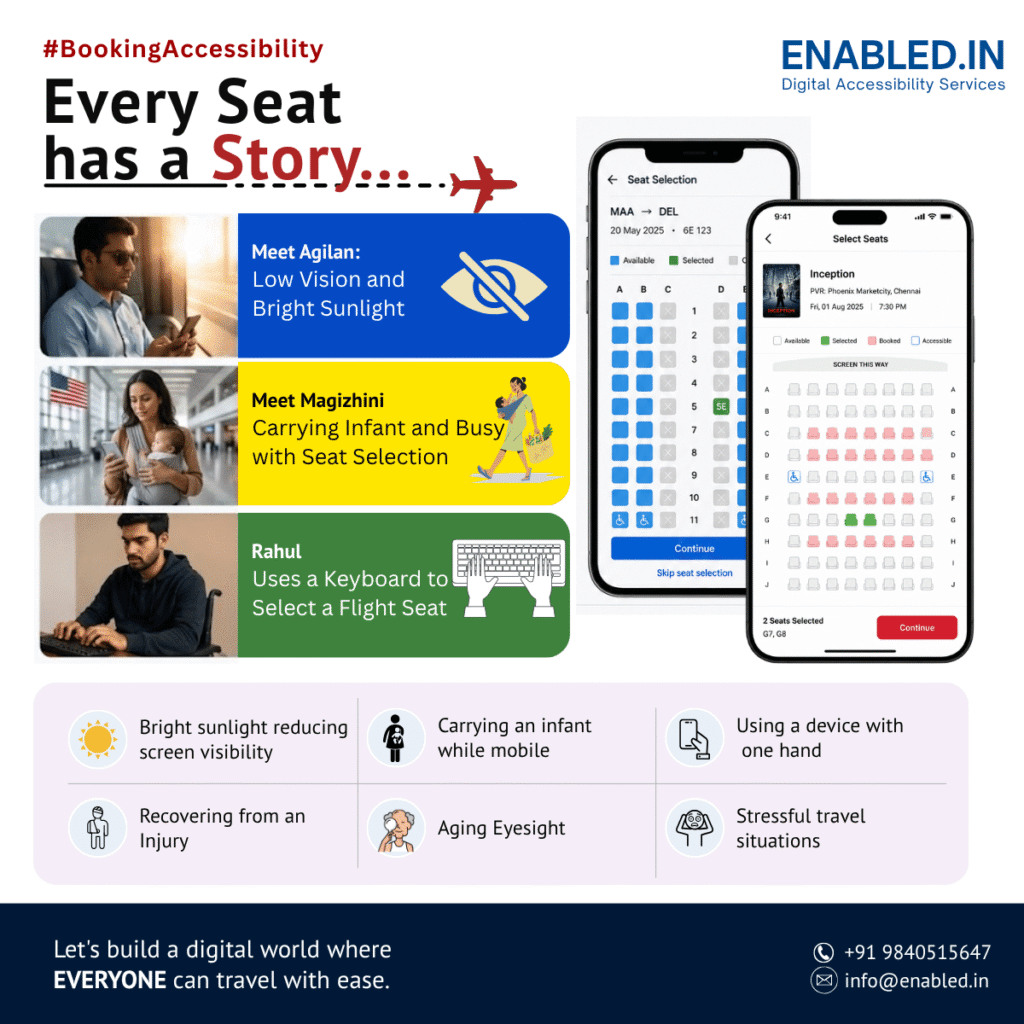
Every Seat Has a Story
It was 6:15 AM.
The airport was already crowded.
People hurried toward their gates, checked boarding passes, answered calls, carried luggage, and made last-minute travel changes.
One seemingly simple screen stood between them and their journey.
Seat Selection.
For many product teams, it’s another feature in the booking flow.
For travelers, it’s the moment that determines whether the journey begins with confidence or frustration.
A seat isn’t just a location on an aircraft, train, bus, or theatre.
It’s where someone’s journey begins.
Why Accessible Seat Selection Matters
Seat selection is one of the most interactive parts of a booking experience.
Unlike entering a audiences/passenger name or payment details, selecting a seat requires users to interpret a visual layout. They must understand seat availability. Users need to recognize icons and interact with a complex interface.
When accessibility is overlooked, many audiences/travelers are unintentionally excluded.
Meet Agilan: Low Vision and Bright Sunlight
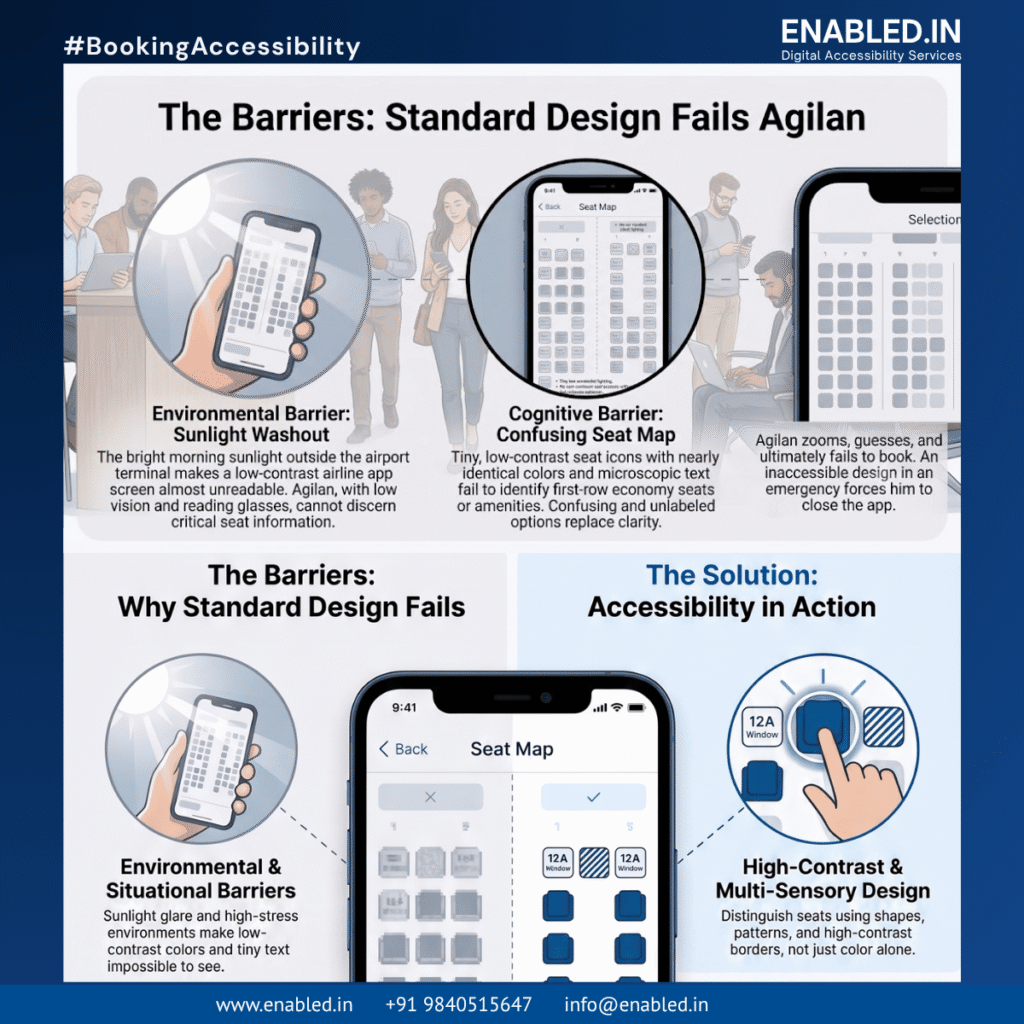
Agilan has low vision.
He wears reading glasses, but the bright morning sunlight makes his phone screen difficult to read.
- Today is an emergency.
- He needs to travel immediately.
- He opens the airline app outside the terminal.
- He wants a first-row economy seat because walking long distances is difficult.
- The seat map appears.
- Tiny seat icons.
- Small text.
- Colors that look nearly identical.
- No clear labels explaining available seats or nearby amenities.
- The sunlight washes out the screen.
- He zooms in.
- He zooms out.
- He guesses.
- Eventually, frustration replaces confidence.
- He closes the application.
- Not because he doesn’t want to travel.
- Because the experience wasn’t designed for him.
Meet Magizhini: One-Handed Booking
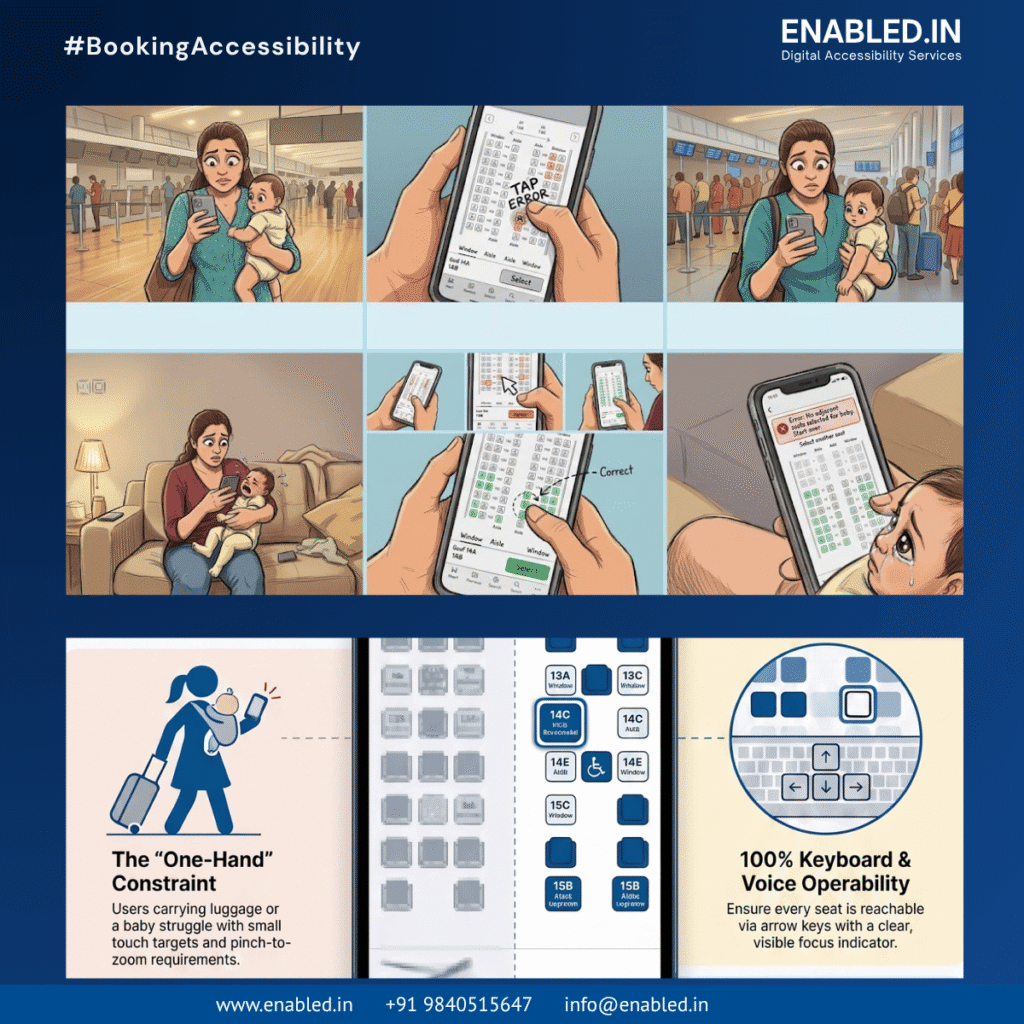
Magizhini is traveling with her baby.
- One arm supports her child.
- The other holds her phone.
- She has only one hand available.
- She needs two seats together.
- The touch targets are too small.
- She taps the wrong seat.
- She starts over.
- The baby begins crying.
The booking becomes stressful instead of simple.
Meet Rahul: Keyboard Users Matter Too
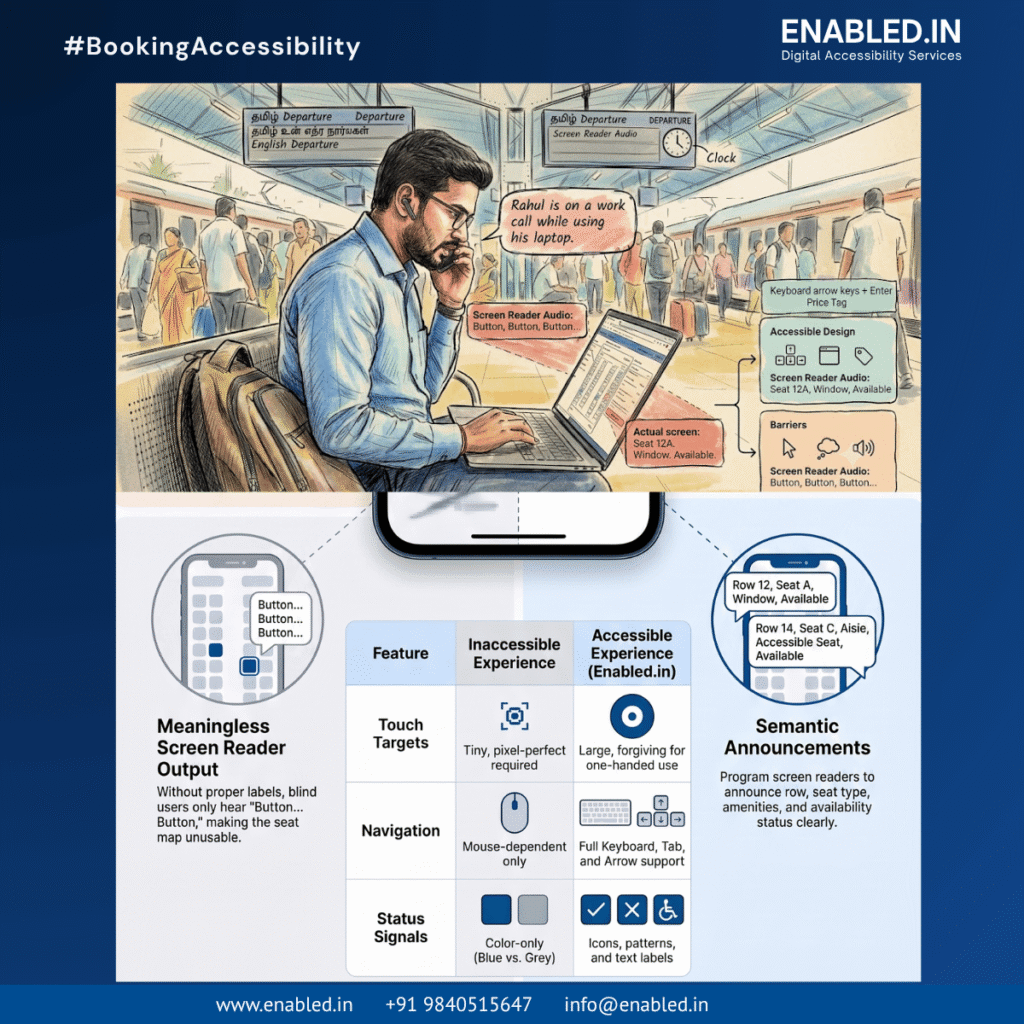
Rahul is waiting at a busy railway station.
He’s on a work call while using his laptop.
He relies on keyboard navigation.
Can he:
- Move through seats using arrow keys?
- Hear meaningful announcements through assistive technology?
- Understand which seats are available?
- Complete booking without a mouse?
If not, accessibility has become a barrier instead of an enabler.
What Screen Reader Users Experience
Imagine opening a seat map with a screen reader.
Instead of hearing:
Seat 12A. Window seat. Economy. Available.”
The screen reader announces:
Button… Button… Button…”
Without accessible names and descriptions, users cannot identify:
- Available seats
- Occupied seats
- Selected seats
- Window or aisle seats
- Premium seating
- Extra legroom
- Exit-row seating
- Companion seating
- Nearby restrooms
- Emergency exits
- Bassinet locations
- Wheelchair-accessible seating
The booking process becomes guesswork.
Accessibility Helps Everyone
Accessibility is not only for people with permanent disabilities.
Many users experience temporary or situational barriers.
Examples include:
- Bright sunlight reducing screen visibility
- Carrying luggage or a child
- Using a device with one hand
- Recovering from an injury
- Aging eyesight
- Stressful travel situations
- Poor network connectivity
- Travelling while multitasking
Designing for accessibility improves the experience for everyone.
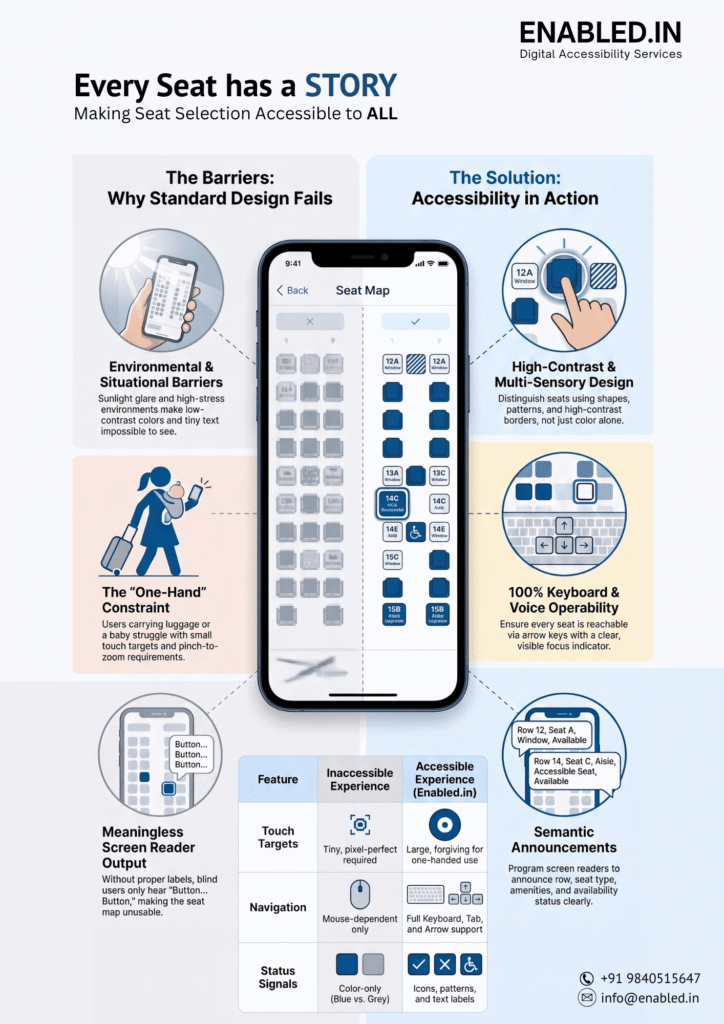
Characteristics of an Accessible Seat Selection Interface
A well-designed seat map should allow users to:
- Navigate using only a keyboard.
- Use screen readers to understand every seat.
- Distinguish available, occupied, reserved, and selected seats.
- Identify window, middle, aisle, premium, and exit-row seats.
- Understand nearby amenities.
- Zoom without losing content or functionality.
- Use high-contrast colors.
- Operate with one hand.
- Complete booking independently.
These capabilities improve both accessibility and usability.
Business Benefits of Accessible Seat Selection
- Accessibility is more than compliance.
- It delivers measurable business value.
- Organizations often experience:
| Business Benefit | Impact |
|---|---|
| Lower booking abandonment | More completed reservations |
| Better customer satisfaction | Increased loyalty |
| Fewer support requests | Reduced operational costs |
| Wider customer reach | Inclusive experiences for everyone |
| Regulatory compliance | Reduced legal and reputational risk |
| Improved brand reputation | Stronger customer trust |
Accessibility Standards That Apply
Accessible booking experiences are commonly evaluated against internationally recognized standards, including:
- WCAG 2.2 AA
- Section 508 (United States)
- EN 301 549 (Europe)
- Americans with Disabilities Act (ADA) where applicable
- Other regional accessibility regulations
Meeting these standards helps organizations create more inclusive digital services.
How Enabled.in Supports Accessible Booking Experiences
Enabled.in partners with organizations to improve accessibility across booking platforms, including:
- Airlines
- Railway reservation systems
- Bus ticketing platforms
- Movie ticketing applications
- Stadium and event booking systems
Services include:
- Accessibility audits
- Keyboard accessibility testing
- Screen reader testing
- Manual accessibility evaluation
- Assistive technology compatibility testing
- Real-user testing with persons with disabilities
- WCAG 2.2 conformance assessments
- VPAT® and Accessibility Conformance Report (ACR) documentation
The objective is straightforward:
Get in touch with Enabled.in
Contact Us: https://enabled.in/contact/
Learn more about Online Travel Booking Accessibility: https://enabled.in/online-travel-booking-accessibility/
FAQ
Designing seat maps to allow everyone independent selection and booking is known as accessible seat selection. This includes people with disabilities, older adults, and users experiencing temporary or situational limitations. An accessible seat map supports screen readers, keyboard navigation, sufficient colour contrast, zoom, large touch targets, and clear seat descriptions.
Seat selection is one of the most interactive parts of any booking journey. If users cannot identify available seats, they may abandon the reservation altogether. They might also leave if they can’t navigate the seat map or complete their booking independently. Accessible seat selection removes these barriers and provides an inclusive experience for all travellers and audiences.
Most accessible booking systems are evaluated against recognised standards such as:
WCAG 2.2 Level AA
WCAG 3.0 (emerging guidance)
Section 508 (United States)
EN 301 549 (European Union)
Americans with Disabilities Act (ADA) where applicable
Other regional digital accessibility regulations
Following these standards helps organisations build inclusive and legally compliant digital services.
Discover more from Enabled.in
Subscribe to get the latest posts sent to your email.