Why EHR Accessibility Is Non-Negotiable for Quality Healthcare
Electronic Health Records (EHRs) are the foundation of modern healthcare. They help clinicians deliver faster, safer, and more coordinated care. But these systems only create value when everyone, including patients, healthcare staff, and people with disabilities, can use them easily. Making EHRs accessible is not just about compliance. It is about improving patient care, reducing risk, and increasing efficiency.
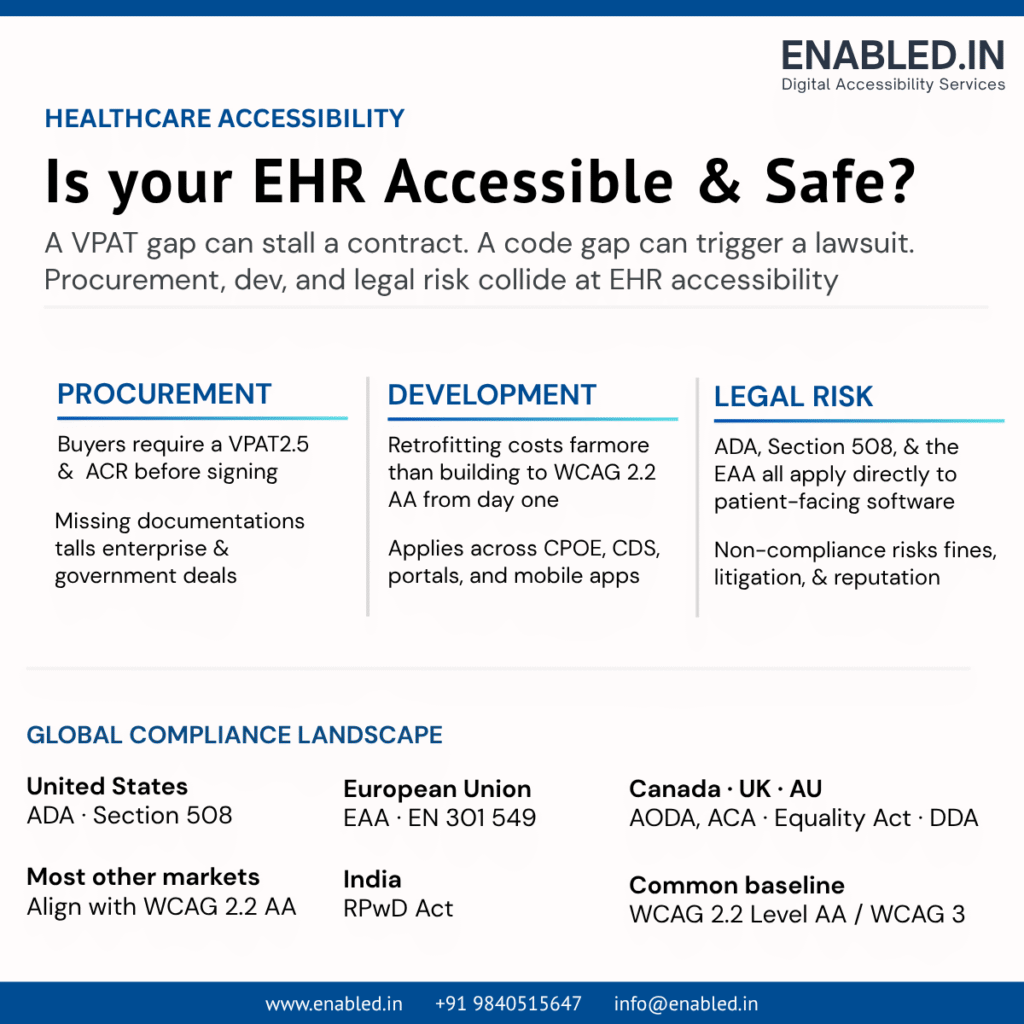
Key Points
Better Patient Care
- Patients can access their health records, book appointments, and communicate with providers without barriers.
- Equal access leads to better health outcomes and higher patient satisfaction.
Supports Healthcare Professionals
- Accessible EHRs help clinicians, nurses, and staff, including those with disabilities, work more efficiently.
- Better usability reduces errors and improves productivity.
Improves Patient Safety
- When critical information like medication alerts or lab results is accessible, clinicians can make faster and more precise decisions.
- Accessibility helps reduce delays and medical errors.
Meets Legal and Regulatory Requirements
- Healthcare organizations must give equal digital access under accessibility laws and standards.
- Non-compliance can result in legal action, financial penalties, and reputational damage.
Future-Proofs Digital Healthcare
- As organizations adopt AI, telehealth, patient portals, and cloud-based EHRs, accessibility should be built into every stage of development.
- Fixing accessibility early is faster and less expensive than making changes later.
Benefits the Entire Organization
- Accessible EHRs improve the user experience for everyone, not just people with disabilities.
- They increase adoption, reduce support requests, lower operational costs, and strengthen trust in digital healthcare services.
Accessibility Is a Patient Safety Priority
Accessibility in healthcare is more than a usability feature. It directly impacts patient safety.
If an EHR is not accessible, clinicians may miss important allergy alerts, medication warnings, or critical notifications. This can delay clinical decisions and increase the risk of medical errors.
Patients also rely on accessible portals to view test results. They use them to ask for prescription refills and schedule appointments. They also communicate with their care teams. When these systems are difficult to use, treatment is delayed, and patient engagement can decline.
Making EHRs accessible helps healthcare organizations deliver safer, faster, and more reliable care.
Business Benefits of Accessible EHR Systems
Investing in accessibility provides both clinical and business value.
Key Benefits
- Improves patient satisfaction and engagement
- Increases clinician productivity
- Reduces training time for users
- Helps reduce medical documentation errors
- Lowers IT support and maintenance costs
- Supports better interoperability across healthcare systems
- Creates a more inclusive workplace for employees
- Strengthens compliance with healthcare regulations
- Reduces legal and compliance risks
- Improves eligibility for government and enterprise procurement
Accessible EHRs also offer a better user experience. Clear navigation, consistent design, and easy-to-use interfaces help all users, not just people with disabilities. This leads to higher adoption, greater efficiency, and better overall healthcare outcomes.
How Accessibility Gaps Impact Healthcare Organizations
Accessibility issues affect more than compliance. They can impact patient care, staff efficiency, and overall business performance.
Common Business Risks
- Delays in patient care and treatment
- Increased workload for clinicians and healthcare staff
- Lower staff productivity and efficiency
- Higher IT support and maintenance costs
- Greater risk of medical errors
- Reduced patient satisfaction and engagement
- Increased legal and regulatory risks
- Challenges in winning government and enterprise contracts
- Damage to the organization’s reputation and patient trust
Accessibility should be viewed as a strategic business investment, not just a compliance need. Organizations that build accessible EHR systems improve patient outcomes. They reduce operational risks, and create a better experience for both patients and healthcare professionals.
Understanding Accessibility Standards and Worldwide Accessibility Laws
| Accessibility Standard / Law | Region | Healthcare Impact |
|---|---|---|
| WCAG 2.2 Level AA | Global | International standard for accessible EHRs, EMRs, patient portals, websites, and mobile apps. |
| ADA (Title II & III) | USA | Requires public and private healthcare providers to offer accessible digital healthcare services. |
| Section 508 | USA (Federal) | Applies to healthcare software used by or sold to U.S. federal agencies; often supported with VPAT. |
| European Accessibility Act (EAA) | European Union | Requires accessible digital healthcare products and services across EU member states. |
| EN 301 549 | Europe | European ICT accessibility standard used for healthcare software procurement and compliance. |
| AODA | Ontario, Canada | Requires accessible healthcare websites, patient portals, and online services. |
| Accessible Canada Act (ACA) | Canada | Promotes barrier-free digital healthcare services in federally regulated sectors. |
| Equality Act 2010 | United Kingdom | Requires healthcare organizations to give equal digital access for people with disabilities. |
| Disability Discrimination Act (DDA) | Australia | Ensures healthcare providers offer accessible digital services and medical systems. |
| RPwD Act | India | Promotes accessible digital healthcare services for persons with disabilities. |
| Other WCAG-Based Regulations | Japan, Singapore, UAE, Brazil, New Zealand, Israel, and others | Most countries align with WCAG, making accessible EHRs easier to deploy globally. |
4. EHR Accessibility Requirements by Feature
Every feature in an Electronic Health Record (EHR) system should be accessible to clinicians, patients, caregivers, and administrative staff. The table below summarizes the key accessibility requirements and the business benefits for each major EHR module.
| EHR Feature | Key Accessibility Requirements | Business Benefits |
|---|---|---|
| Patient Login & Authentication | Keyboard navigation, accessible MFA, clear labels, error messages, session timeout alerts | Secure and inclusive access, fewer login failures, reduced support calls |
| Patient Registration & Demographics | Accessible forms, labels, date picker, dropdowns, logical tab order | Faster registration, improved data accuracy, better patient experience |
| Medical History | Proper headings, accessible tables, logical reading order, screen reader support | Faster access to patient records and improved clinical decisions |
| Clinical Documentation | Keyboard shortcuts, accessible rich text editor, visible focus, screen reader compatibility | Increases clinician productivity and reduces documentation errors |
| Medication Management | Accessible tables, autocomplete, dosage alerts, high-contrast warnings | Improves medication safety and reduces prescribing errors |
| Laboratory & Diagnostic Results | Accessible tables, tagged PDFs, responsive layout, zoom up to 400% | Easier review of test results and improved patient engagement |
| Computerized Provider Order Entry (CPOE) | Keyboard-accessible workflows, accessible dialogs, validation messages | Faster order entry, fewer clinical errors, improved patient safety |
| Clinical Decision Support (CDS) | Accessible alerts, keyboard interaction, screen reader announcements, non-color warnings | Enables timely clinical decisions and enhances patient safety |
| Appointment Scheduling | Accessible calendar, manual date entry, keyboard support, mobile accessibility | Reduces missed appointments and improves scheduling efficiency |
| Interoperability & Health Information Exchange | Accessible exports, semantic HTML, accessible APIs, structured documents | Ensures accessible data sharing across healthcare systems |
| Patient Portal | Responsive design, accessible dashboard, secure messaging, keyboard and screen reader support | Improves patient engagement and encourages self-service |
| Billing & Coding | Accessible payment forms, invoices, tagged PDFs, validation messages | Simplifies payments and reduces billing-related barriers |
| Reporting & Analytics | Accessible dashboards, charts with data tables, tagged exports, accessible Excel reports | Enables all users to analyze healthcare data and supports compliance |
VPAT 2.5: Demonstrating Accessibility Conformance
A Voluntary Product Accessibility Template (VPAT) 2.5 is a document that explains how well a software product meets recognized accessibility standards. It is widely used during software procurement by healthcare organizations, government agencies, universities, and large enterprises.
Once completed, a VPAT becomes an Accessibility Conformance Report (ACR). The report helps buyers understand how accessible a product is for people with disabilities.
Why VPAT Matters for EHR Systems
Many healthcare organizations require a VPAT before purchasing or renewing an EHR solution. A well-prepared VPAT shows that accessibility has been evaluated. It also documents the evaluation, making it easier for procurement teams to assess the product.
Key Benefits
- Supports government and enterprise procurement requirements
- Demonstrates a commitment to accessibility and inclusion
- Builds trust with customers and regulators
- Reduces procurement delays
- Identifies accessibility strengths and areas for improvement
Accessibility Standards Covered by VPAT
Depending on the market and customer requirements, a VPAT may evaluate compliance with:
- WCAG 2.2 Level AA
- Section 508
- EN 301 549
VPAT Conformance Levels
Each accessibility need is assigned one of the next ratings:
| Conformance Level | Meaning |
|---|---|
| Supports | The feature fully meets the accessibility need. |
| Partially Supports | Most requirements are met, but some accessibility issues persist. |
| Does Not Support | The feature does not meet the accessibility need. |
| Not Applicable | The necessity does not apply to the product or feature. |
What Makes a Strong VPAT?
A high-quality VPAT should include:
- Clear conformance ratings for each necessity
- Detailed explanations of how accessibility is implemented
- Any known accessibility limitations
- Test results from manual and automated accessibility evaluations
- References to the applicable accessibility standards
A well-documented VPAT helps healthcare organizations make informed purchasing decisions. It demonstrates compliance efforts. It shows a strong commitment to delivering accessible EHR solutions.
Benefits of an Accessible EHR
Investing in accessibility provides measurable benefits for healthcare providers, software vendors, and patients.
- Improved Patient Care – Patients can independently access healthcare services and medical information.
- Reduced Medical Errors – Accessible alerts and workflows improve clinical decision making.
- Better User Experience – Accessible interfaces benefit every user, not only those with disabilities.
- Higher Clinician Productivity – Healthcare professionals spend less time navigating software and more time caring for patients.
- Improved Regulatory Compliance – Accessible systems help organizations meet requirements under:
- WCAG 2.2 AA
- ADA
- Section 508
- EN 301 549
- European Accessibility Act
- Other international accessibility regulations
- Greater Procurement Opportunities – Government agencies and enterprise customers increasingly require VPAT documentation before purchasing software.
- Lower Legal Risk – Accessible healthcare systems reduce the likelihood of accessibility complaints, investigations, and litigation.
Frequently Asked Questions (FAQ)
WCAG 2.2 provides globally recognized guidelines for making digital products accessible. Following these guidelines helps healthcare organizations improve usability, support patients and clinicians with disabilities, reduce risks, and meet accessibility requirements.
Yes. In the United States, healthcare providers covered by the Americans with Disabilities Act (ADA) must provide equal access to digital healthcare services, including EHR systems and patient portals, for people with disabilities.
A Voluntary Product Accessibility Template (VPAT) is a document that explains how well a software product meets accessibility standards such as WCAG, Section 508, and EN 301 549. Many healthcare organizations require a VPAT during the software procurement process.
No. Automated tools can identify many common accessibility issues, but they cannot detect everything. A complete accessibility evaluation should also include manual testing, keyboard testing, screen reader testing, mobile testing, and usability testing with people who have disabilities.
Accessibility testing should be part of the entire software development lifecycle. Organizations should test before every major release, after significant updates, and during regular regression testing to ensure the EHR remains accessible and compliant over time.
Why Choose Enabled.in for EHR Accessibility?
Building an accessible EHR doesn’t have to be complicated. At Enabled.in, we help healthcare organizations make their EHRs, patient portals, and healthcare applications accessible, compliant, and easy to use.
Do you need an accessibility audit, VPAT, or guidance to fix accessibility issues? Our experts are here to support you at every step.
Our Services
- EHR accessibility audits
- WCAG 2.2 compliance testing
- Patient portal accessibility testing
- VPAT 2.5 and ACR preparation
- ADA, Section 508, and EN 301 549 compliance
- Manual and automated accessibility testing
- Screen reader and keyboard testing
- Mobile accessibility testing
- Accessibility remediation support
- Accessibility training and consulting
Why Work With Us?
- Healthcare accessibility experts
- Practical, easy-to-follow recommendations
- Fast and reliable testing
- Clear reports with actionable fixes
- Support from assessment to compliance
Let’s Make Your EHR Accessible
Need help improving your EHR or healthcare application?
Our team is ready to help you. We will identify accessibility issues. We will also meet compliance requirements. Our goal is to create a better experience for every user.
Talk to our accessibility experts today.
Website: https://enabled.in
Email: info@enabled.in
Phone: +919840515647(whatsapp)
Discover more from Enabled.in
Subscribe to get the latest posts sent to your email.