Digital Inclusion Needs More Than an Online Service
The latest LGA research shows why councils need stronger planning, better funding and clear measures of whether residents can use essential services.
A website can pass many technical checks and still leave people unable to complete a task. Councils need to look at the full experience.
What Does the 2026 LGA Report Reveal?
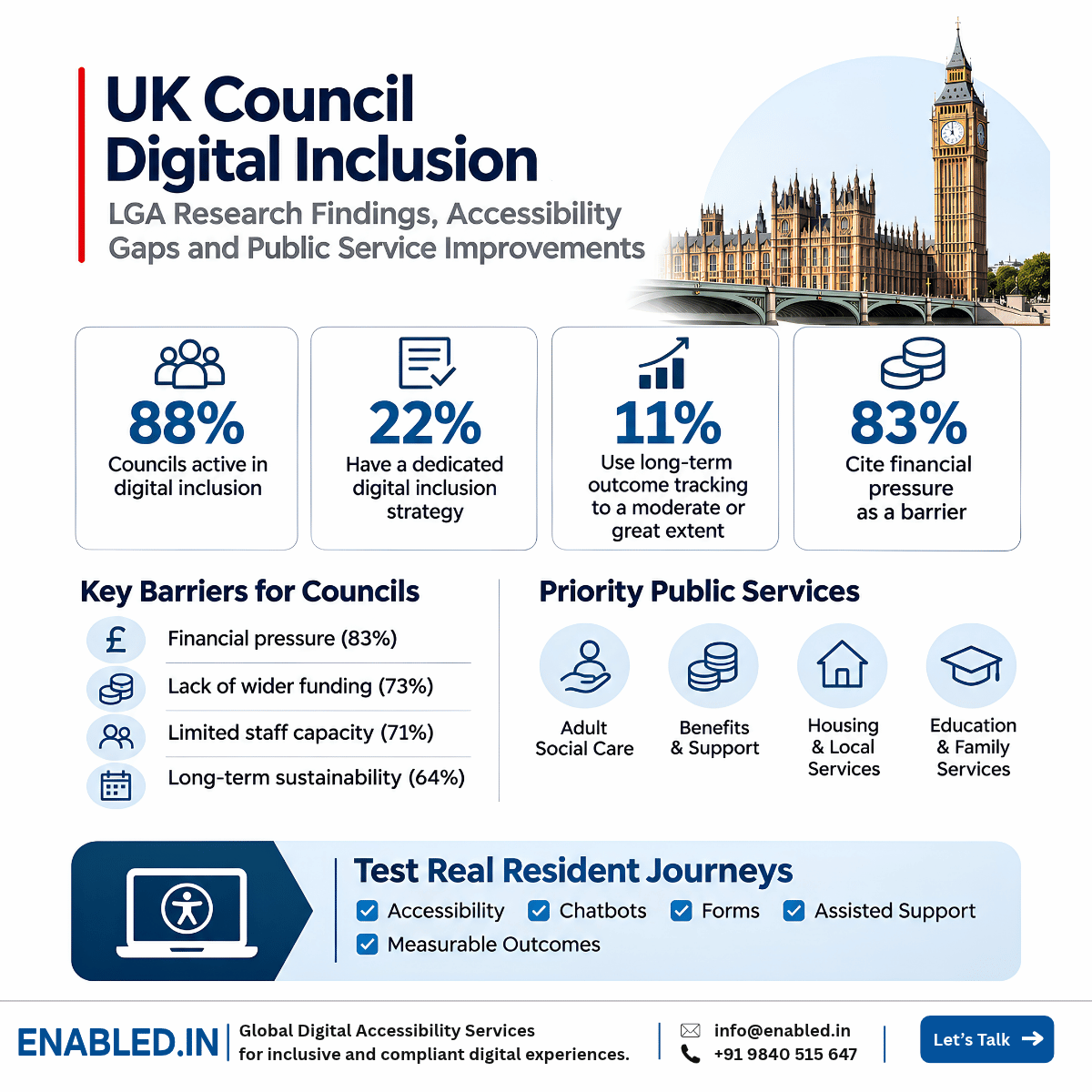
The Local Government Association studied digital inclusion across English councils. Of 83 councils surveyed, 88% reported active work, but only 22% had a dedicated strategy. Just 11% used long-term outcome tracking to a moderate or substantial extent.
The main barriers were financial pressure, limited funding and lack of staff capacity.
What Are the Main Findings from the 2026 LGA Study?
The research was commissioned by the Local Government Association. It included a survey of 83 English councils, interviews with ten digital inclusion leaders and a review of existing research.
Three Barriers to Progress
- 83%: Financial pressure Councils face competing demands on already limited budgets.
- 73%: Limited wider funding Teams struggle to find stable support for digital inclusion work.
- 71%: Limited staff capacity Small teams must support many services and residents.
Read the original LGA report , published 4 November 2026.
Digital Inclusion and Digital Accessibility: Why Councils Need Both
Digital Inclusion
Helps people get online and use digital services. It includes devices, internet access, skills, confidence and support.
Digital Accessibility
Removes barriers for people with disabilities. It includes accessible forms, screen reader support, keyboard use and readable content.
A resident may have internet access but still be unable to complete an inaccessible form. Another resident may find the form accessible but lack a device or digital skills.
A successful council service must consider both needs.
Which Council Services Should Be Tested First?
Start with services that affect daily life, care, housing and financial support.
Can residents locate the right service?
Are the steps and rules clear?
Can users submit forms and documents?
Is help available when needed?
Priority Services for Review
- Adult social care applications
- Benefits and financial support
- Housing and repair requests
- Education and family services
- Payments and account services
- Complaints and public enquiries
Test each service from start to finish, including forms, document uploads, error messages and confirmation.
Chatbots and Automated Triage: What Can Go Wrong?
Councils are using more automated tools to answer questions and direct residents to services. These tools can help, but they must not create new barriers.
Six Areas to Review
- Keyboard access: Can the chatbot be used without a mouse?
- Screen reader support: Are new messages announced?
- Clear language: Can residents understand the questions?
- Error recovery: Can users correct mistakes?
- Human support: Is there a clear route to staff?
- Fair access: Can residents get help without relying only on automation?
How Can Councils Show That Accessibility Investment Works?
A list of WCAG failures helps developers fix technical problems. But service leaders also need to know whether residents can finish tasks.
| Measure | What to Track | Why It Matters |
|---|---|---|
| Task completion | Successful service submissions | Shows whether residents can finish |
| Assistive technology | Keyboard and screen reader success | Finds disability-related barriers |
| Form errors | Failed fields and repeated attempts | Finds confusing steps |
| Assisted support | Help requests and referrals | Shows where extra help is needed |
| Retesting | Validated fixes | Confirms barriers were addressed |
Collect a baseline, fix the main barriers and test again. Compare the results over time.
A Five-Step Inclusive Public Service Assessment
- Choose Priority Services Select important tasks in care, benefits, housing or education.
- Test Complete Journeys Include keyboard use, screen readers, mobile devices and assisted support routes.
- Record Barriers and Outcomes Capture WCAG findings, user impact and task completion results.
- Fix and Retest Provide clear guidance and validate each change.
- Track Long-Term Improvement Review service access, user feedback and support needs.
How Enabled.in Supports Public Service Teams
Enabled.in offers WCAG accessibility audits, assistive technology testing, forms and document reviews, chatbot accessibility testing, remediation guidance and retesting.
An inclusive service journey review can combine technical findings with evidence of task completion and support needs.
UK public sector teams should assess applicable requirements under the Public Sector Bodies Accessibility Regulations 2018 and the Equality Act 2010. WCAG 2.2 AA is a useful testing target.
Frequently Asked Questions
What did the 2026 LGA digital inclusion report find?
Among 83 responding English councils, 88% reported active digital inclusion work. Only 22% had a dedicated strategy.
Is digital inclusion the same as accessibility?
No. Inclusion covers access, skills and support. Accessibility removes barriers for people with disabilities.
Which council services need accessibility testing?
Priority services include care, benefits, housing, education, payments and public enquiries.
Should councils test chatbots and automated triage?
Yes. Review keyboard use, screen reader support, error handling, clear language and access to human help.
How can councils measure improvements?
Track task completion, assistive technology success, form errors, support requests and retesting results.
How can Enabled.in help?
Enabled.in supports WCAG audits, service journey testing, assistive technology evaluation, remediation and retesting.
Measure Whether Residents Can Complete Your Services
Start with one priority council service. Identify barriers, test real user journeys and build evidence for improvement.
Request an Accessibility AssessmentEmail: sathasivam@enabled.in
Phone / WhatsApp: +91 9840515647
Discover more from Enabled.in
Subscribe to get the latest posts sent to your email.