VPAT services help organizations evaluate the accessibility of software, websites, and mobile apps. They also assess documents and other information and communications technology (ICT).
They then document the results in an Accessibility Conformance Report (ACR). Enabled.in provides digital accessibility services that include accessibility audits, testing, assistive technology testing, VPAT/ACR reporting, and remediation support.
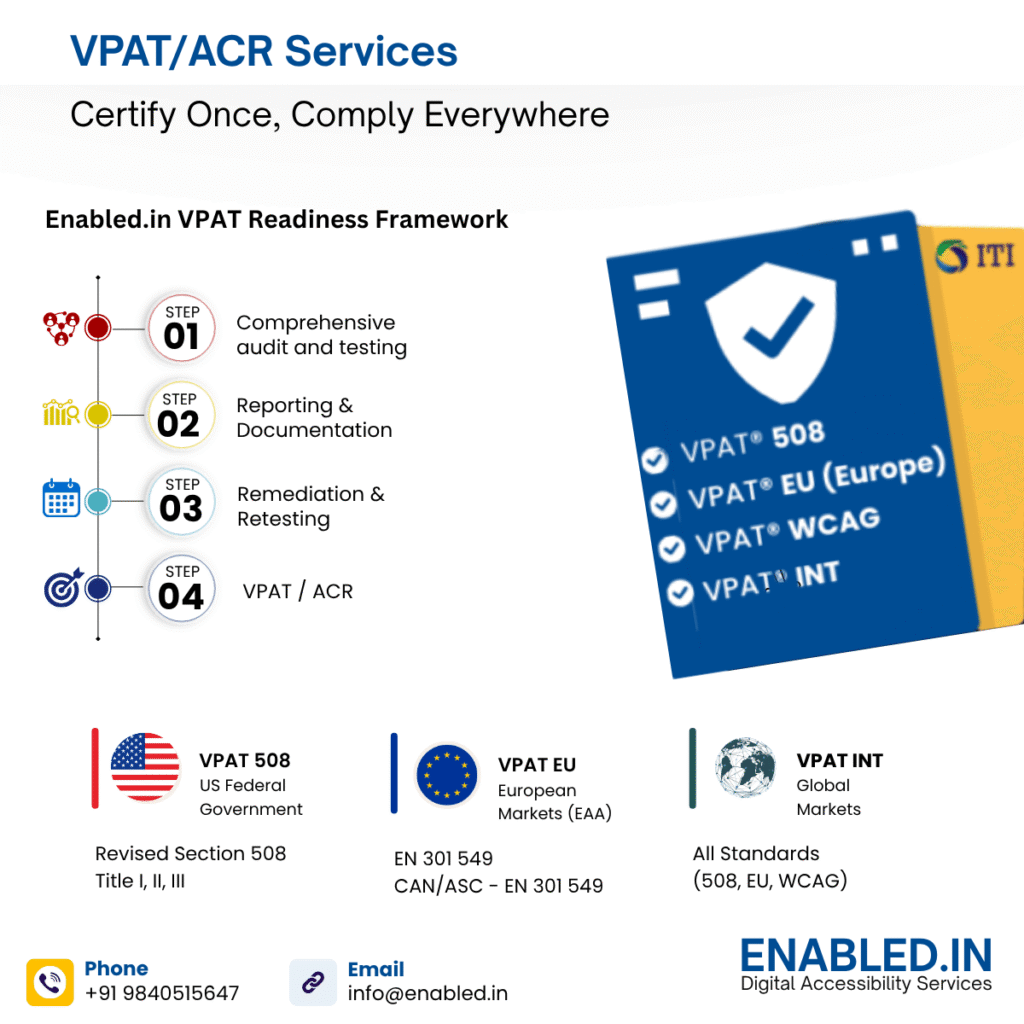
What Are VPAT Services?
VPAT services provide professional accessibility evaluation and reporting. They help organizations assess an ICT product against applicable accessibility requirements. Additionally, they prepare an Accessibility Conformance Report.
A VPAT service can include:
- Accessibility scope and requirements review
- Automated accessibility testing
- Manual accessibility testing
- Keyboard testing
- Screen-reader testing
- Assistive technology testing
- WCAG evaluation
- Section 508 evaluation
- Accessibility findings and recommendations
- VPAT/ACR preparation
- ACR review
- Remediation support
- Retesting after accessibility improvements
The exact service depends on the product and the standards or procurement requirements that apply.
Enabled.in currently lists VPAT/ACR reporting and accessibility audits. It also offers accessibility testing and assistive technology testing. The services include user testing with people with disabilities and remediation support among its digital accessibility services.
What Is a VPAT and What Is an ACR?
The terms VPAT and ACR are closely related, but they are not exactly the same.
A VPAT® is the reporting template.
An Accessibility Conformance Report (ACR) is the completed report that communicates the results of an accessibility evaluation.
Section508.gov explains that the product owner or developer must first test the product against applicable standards before completing an ACR.
| Term | Simple meaning |
|---|---|
| VPAT® | A template for reporting accessibility information |
| ACR | The completed accessibility conformance report |
| Accessibility testing | Testing a product against applicable accessibility requirements |
| Remediation | Fixing accessibility barriers found during testing |
Does a VPAT mean a product is fully accessible?
No.
A VPAT or ACR documents the accessibility characteristics of the product and the results of the evaluation. It is not a universal guarantee. Not every user, environment, device, or future product version will be accessible.
That distinction is important when using VPAT services.
ssibility.
Explain accessibility clearly
A general statement such as “our software is accessible” does not tell a buyer very much.
An ACR provides a structured way to explain the requirements the product supports. It also explains which requirements the product partially supports and does not support. Additionally, it considers which requirements are not applicable.
It can also include remarks explaining limitations.
3. Find accessibility barriers
Accessibility testing can identify issues that affect people using:
- Keyboard navigation
- Screen readers
- Switch controls
- Browser accessibility features
- Magnification
- Alternative input methods
- Other assistive technologies
Testing can also identify problems with forms, headings, focus, buttons, links, error messages, navigation, and dynamic content.
4. Help procurement teams compare products
A structured ACR gives buyers more useful information than a general accessibility statement.
Section508.gov provides ACR resources specifically to support accessibility information during ICT procurement.
5. Support accessibility improvement
A VPAT evaluation can also help product teams understand where accessibility improvements may be needed.
The process can become:
Test → Identify → Document → Fix → Retest → Update
This makes the VPAT part of a broader accessibility program rather than treating it as a standalone document.
What Standards Can VPAT Services Cover?
The appropriate standard depends on the product, market, contract, and purpose of the evaluation.
Section 508
Section 508 is particularly important for organizations supplying ICT to the U.S. federal government.
Section508.gov explains that an ACR shows how a product conforms to applicable Section 508 Technical Standards. They state that the VPAT is the most common method for creating the report.
WCAG 2.2
Web Content Accessibility Guidelines (WCAG) 2.2 is a W3C Recommendation that provides testable accessibility requirements for web content.
WCAG 2.2 includes three conformance levels:
- Level A
- Level AA
- Level AAA
W3C recommends using WCAG 2.2 to maximize the future applicability of accessibility efforts.
WCAG 2.2 also introduced additional success criteria covering areas such as focus visibility and target size. It also addresses dragging movements, consistent help, redundant entry, and accessible authentication.
EN 301 549
EN 301 549 is a European accessibility standard for ICT products and services.
W3C notes that organizations addressing the European Accessibility Act commonly use WCAG together with EN 301 549. W3C also notes that the current EN 301 549 version uses WCAG 2.1 and that a future revision is expected to use WCAG 2.2.
Therefore, organizations should confirm the exact requirements that apply to their product and target market before starting an evaluation.
| Standard | Common use |
| Section 508 | U.S. federal ICT procurement |
| WCAG 2.2 | Web and digital accessibility |
| EN 301 549 | European ICT accessibility |
| VPAT International | International accessibility reporting |
| Customer-specific requirements | Contract and procurement requirements |
How Enabled.in Helps with VPAT Services
Enabled.in provides digital accessibility services covering accessibility audits, testing, assistive technology evaluation, VPAT/ACR reporting, and remediation support.
Its approach can be viewed as a simple process:
Understand → Test → Report → Improve
1. Understand the Product
Before testing starts, the product and evaluation scope need to be clear.
For a SaaS product, this may include:
- Login and authentication
- Main application
- Dashboard
- Forms
- Navigation
- Search
- Tables
- Interactive controls
- Notifications
- Help content
- Documentation
For a mobile app, website, digital document, or other ICT product, the scope may be different.
A clear scope helps ensure that the final ACR accurately represents what was evaluated.
2. Test Accessibility
Enabled.in provides accessibility audit and testing services as part of its digital accessibility offering. Its site also describes assistive technology testing and testing with people with disabilities.
Accessibility testing may combine:
- Automated testing
- Manual testing
- Assistive technology testing
3. Identify Accessibility Gaps
Testing results can be used to identify barriers and explain their impact.
For example, testing might identify:
- A button that cannot be reached using a keyboard
- A form field without a useful accessible name
- A dialog with incorrect focus behavior
- A heading structure that makes navigation difficult
- A dynamic message that is not announced to a screen reader
These findings can then be prioritized for remediation.
4. Map Findings to Applicable Requirements
The next step is connecting test results with the relevant accessibility requirements.
This makes the final report more useful. Customers can understand which requirement was evaluated. They can also see what the product’s current status is.
5. Prepare the VPAT/ACR
The completed ACR can include information such as:
- Product name
- Product version
- Report date
- Product description
- Evaluation scope
- Evaluation methods
- Testing tools
- Applicable standards
- Conformance information
- Remarks and explanations
Section508.gov specifically identifies product information and evaluation methods as important components of an ACR.
6. Support Remediation and Retesting
Finding accessibility issues is only the beginning.
Enabled.in also provides remediation support as part of its accessibility services.
A practical accessibility workflow is:
Accessibility Audit → Remediation → Retesting → ACR Review
This helps organizations keep accessibility documentation aligned with product improvements.
VPAT Services for SaaS Products
SaaS companies often need accessibility documentation when selling to enterprise or government customers.
A SaaS accessibility evaluation may cover:
- Login and authentication
- Navigation
- Dashboards
- Forms
- Search and filtering
- Tables
- Data visualization
- Buttons and controls
- Notifications
- Error messages
- Keyboard operation
- Screen-reader interaction
- Responsive behavior
- Supporting documentation
The scope should be clearly defined before testing begins.
If a product changes significantly after an ACR is created, the organization should review the report. They should ensure that the existing report still accurately describes the current product.
VPAT Services for Websites, Mobile Apps, and Digital Content
VPAT services are not limited to SaaS applications.
Accessibility evaluations can also be relevant to:
- Websites
- Web applications
- Mobile applications
- Desktop software
- Electronic documents
- E-learning platforms
- E-commerce platforms
- Enterprise applications
- Cloud services
- Digital content
- Hardware interfaces
Enabled.in currently offers accessibility solutions across areas including mobile applications, e-commerce, e-learning, OTT platforms, and other digital products.
The testing scope should always match the product being evaluated.
How Does the VPAT Process Work?
A typical VPAT services process has six steps.
Step 1: Define the scope
Identify the product, version, platforms, features, and workflows to be evaluated.
Step 2: Select the requirements
Determine which standards apply, such as Section 508, WCAG, EN 301 549, or customer-specific requirements.
Step 3: Test accessibility
Use appropriate automated, manual, keyboard, and assistive technology testing.
Step 4: Analyze the findings
Map the results to the applicable accessibility requirements.
Step 5: Prepare the ACR
Document the results, conformance information, evaluation methods, and explanations.
Step 6: Review and maintain
Review the report for accuracy and update it when significant product or accessibility changes occur.
Section508.gov also provides an ACR Editor for creating machine-readable ACR documents in OpenACR format.
How to Choose VPAT Services
Choosing a VPAT provider should involve more than asking whether they can complete a template.
Before selecting a provider, ask:
- What standards will you evaluate?
- What parts of our product will be tested?
- Do you combine automated and manual testing?
- Is keyboard testing included?
- Is screen-reader testing included?
- Do you involve people with disabilities in testing?
- How are accessibility findings documented?
- How are partial-support findings explained?
- Is remediation support available?
- How is the final ACR reviewed?
- How should the ACR be updated after product changes?
A good VPAT service should clearly explain its scope, methodology, evidence, and limitations.
Avoid choosing a provider based only on a promise of “100% accessibility.” A credible evaluation should communicate actual findings rather than make unsupported guarantees.
Why Consider Enabled.in for VPAT Services?
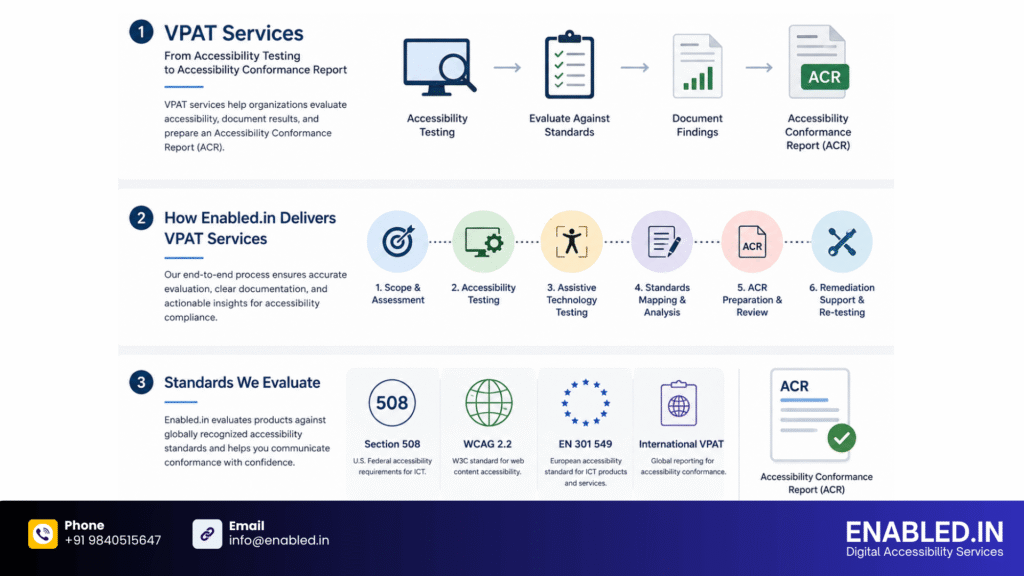
This means organizations can approach VPAT work as part of a broader accessibility process:
Audit → Test → Report → Remediate → Retest
For companies preparing accessibility documentation, this approach can help customers. It supports procurement teams and technology evaluations.
This strategy can offer a more thorough understanding of accessibility. It can provide a more complete view of accessibility. It goes beyond simply completing a reporting template.
The right VPAT service should always be based on the actual product. It should consider applicable requirements and testing scope. The service must use evidence collected during the evaluation.
Frequently Asked Questions About VPAT Services
Yes. SaaS products can be evaluated for accessibility and documented through an appropriate VPAT/ACR process.
It can. The applicable WCAG requirements depend on the selected reporting framework, product, customer requirements, and evaluation scope.
No. Testing identifies accessibility barriers. Remediation addresses those barriers.
An ACR should be reviewed when significant changes to the product, accessibility functionality, evaluation scope, or applicable requirements could make the existing report inaccurate.
Yes. ACRs provide structured accessibility information that procurement teams can use when evaluating ICT products. Section508.gov provides ACR resources specifically for accessibility procurement.
Discover more from Enabled.in
Subscribe to get the latest posts sent to your email.