Enabled.in | European Banking Accessibility
European Banking Accessibility: EAA Compliance, WCAG 2.2 AA and Digital Banking Audits
Can every customer open an account, verify their identity, transfer money and manage their finances independently?
An accessible banking homepage does not guarantee an accessible banking experience. Accessibility must work across complete financial transactions.
The European Accessibility Act (EAA) applies to specified consumer banking services from 28 June 2025, subject to applicable transitional provisions and national legislation.
For banks and fintech companies, accessibility extends beyond public websites to account opening, KYC, authentication, payments, statements, customer support and mobile applications.
This guide explains applicable requirements, research findings, common accessibility barriers and practical testing methods.
Executive Summary
Digital banking accessibility means customers with disabilities can use essential financial services without avoidable barriers.
An effective banking accessibility audit covers public information, authenticated services, mobile applications and important customer tasks.
- Account opening and identity verification
- Login and multifactor authentication
- Beneficiary management and payments
- Loan and credit applications
- Statements and card controls
- Customer support and complaints
Automated checks alone are not sufficient. Banks also need manual testing, assistive technology validation and representative customer journey assessments.
European Accessibility Act Requirements for Banking
The EAA covers specified consumer banking services, including certain consumer credit, payment, payment-account, electronic-money and investment-related services.
The table below summarises key requirements and their practical banking applications.
| Requirement | Banking Example | Testing Focus |
|---|---|---|
| Web and mobile accessibility | Online banking and mobile apps | Keyboard, screen reader, visual and mobile testing |
| Identification and security | KYC, login, MFA and account recovery | Accessible forms, authentication and errors |
| Payment services | Beneficiaries and money transfers | Transaction journeys and confirmation |
| Electronic signatures | Digital agreements and consent | Document review, signing and feedback |
| Understandable information | Banking instructions, terms and fees | Accessible presentation and applicable B2 language complexity requirement |
| Accessible service information | Help, service details and accessibility information | Accessible content and relevant support channels |
Important: WCAG 2.2 AA is a useful technical testing target, but the EAA has its own legal requirements. Banks should review applicable national legislation and relevant EN 301 549 provisions.
Learn how Enabled.in approaches European Accessibility Act compliance, EN 301 549 testing and accessibility conformance reporting .
What European Banking Accessibility Research Shows
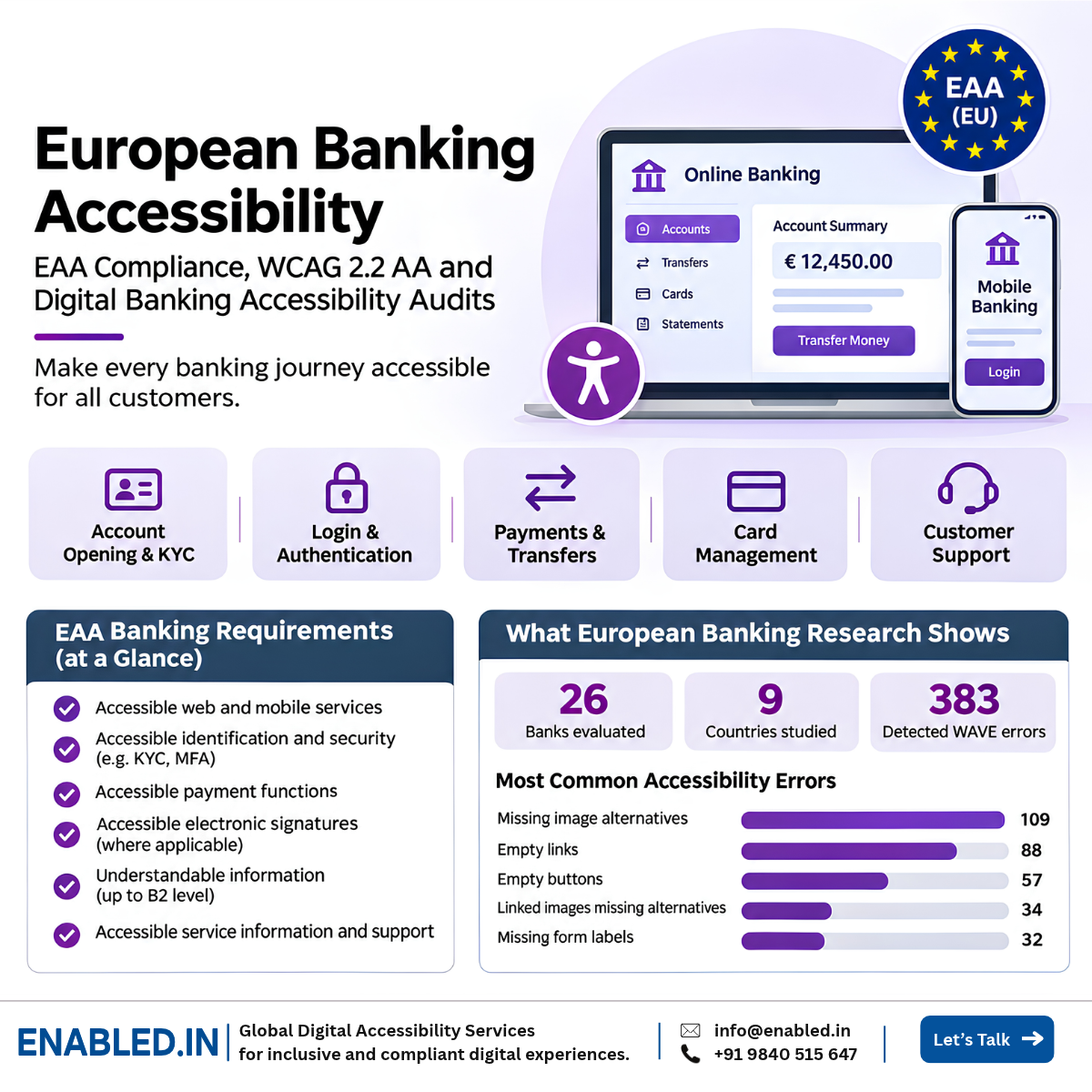
A peer-reviewed study by Marta Musiał and Joanna Rachuba assessed public banking websites in Central and Eastern Europe using WAVE.
Most Common Detected Accessibility Errors
These five categories account for 320 of the 383 errors reported in the study.
What the Research Did Not Test
The study assessed public homepages and main navigation pages. It did not establish whether customers could complete authenticated tasks such as KYC, money transfers, card controls or loan applications.
Practical implication: Banks need accessibility testing across complete customer journeys, not only public-facing pages.
Accessibility Across the Banking Customer Journey
Banking accessibility should follow the tasks customers perform, from opening an account to receiving support.
| Journey | Possible Barrier | Customer Impact |
|---|---|---|
| Account opening | Unlabelled fields or inaccessible uploads | Cannot complete registration |
| KYC | Inaccessible identity verification | Cannot verify identity independently |
| Authentication | OTP errors are not announced | Cannot complete login |
| Transfers | Beneficiary selector is keyboard inaccessible | Cannot select the recipient |
| Statements | PDF reading order is incorrect | Cannot reliably review information |
| Card controls | Freeze-card switch does not expose its state | Cannot confirm card status |
| Support | Chat or complaint form is inaccessible | Cannot request help |
Accessible Account Opening and KYC
Digital onboarding may include registration forms, identity checks, document uploads, consent and account confirmation.
What Should Be Tested?
- Visible labels and accessible names
- Required fields and error messages
- Keyboard-accessible document uploads
- Accessible date pickers and selectors
- Identity verification instructions
- Alternative verification paths
- Consent and electronic signature controls
- Progress indicators and step navigation
- Timeout warnings and recovery
Example: A customer must upload an identity document, but the Upload button cannot be operated using a keyboard. The customer cannot finish onboarding.
Login, MFA and Accessible Authentication
Authentication is a critical banking task. Customers who cannot log in cannot access their accounts.
Common Risks
- OTP fields that block paste
- Unclear authentication instructions
- CAPTCHAs without accessible alternatives
- Timeouts without adequate warning
- Errors not announced to screen readers
- Authentication that relies on memory tests without permitted alternatives
WCAG 2.2 includes 3.3.8 Accessible Authentication (Minimum). Banks should evaluate this requirement while maintaining appropriate security.
Accessible Payments and Money Transfers
Customers must understand the recipient, amount, fees and transaction status before and after a payment.
Priority Testing Areas
- Adding and editing beneficiaries
- Selecting accounts and recipients
- Entering transfer amounts
- Choosing payment dates
- Reviewing transaction details
- Confirming or cancelling payments
- Handling failed transactions
- Receiving status messages
Example: A customer selects Confirm Transfer, but the updated transaction status is not announced to their screen reader. They may be unsure whether the payment succeeded.
Mobile Banking Accessibility
Native mobile applications require testing on real devices with relevant assistive technologies.
iOS and VoiceOver
Test names, traits, focus order, gestures, forms and transaction feedback.
Android and TalkBack
Test labels, states, navigation, gestures and error announcements.
Visual Accessibility
Test text scaling, contrast, orientation and magnification.
Alternative Input
Evaluate relevant keyboard and switch interaction paths.
WCAG 2.2 AA Testing Priorities for Banking
These are important testing priorities, not a replacement for a complete WCAG accessibility audit.
| WCAG Criterion | Banking Example | Testing Focus |
|---|---|---|
| 1.3.1 Info and Relationships | Account forms and tables | Programmatic structure and labels |
| 1.4.3 Contrast (Minimum) | Balances and error messages | Text contrast |
| 1.4.10 Reflow | Narrow banking screens | Responsive reflow |
| 1.4.11 Non-text Contrast | Form borders and states | Control and indicator contrast |
| 2.1.1 Keyboard | Beneficiary selectors | Keyboard operation |
| 2.4.3 Focus Order | Multi-step onboarding | Meaningful focus sequence |
| 2.4.7 Focus Visible | Banking controls | Visible keyboard focus |
| 2.4.11 Focus Not Obscured (Minimum) | Sticky banking navigation | Focused elements remain visible |
| 2.5.8 Target Size (Minimum) | Small mobile controls | Target size or applicable exceptions |
| 3.3.1 Error Identification | Invalid transfer amount | Clear error identification |
| 3.3.4 Error Prevention | Financial transactions | Applicable checking, confirmation or reversal safeguards |
| 3.3.8 Accessible Authentication (Minimum) | Login and recovery | Accessible authentication |
| 4.1.2 Name, Role, Value | Custom selectors and switches | Accessible names, roles and states |
| 4.1.3 Status Messages | Payment confirmation | Appropriate status announcements |
Reference: W3C Web Content Accessibility Guidelines 2.2 .
Third-Party Banking Technology
External systems can create barriers even when the main banking application has been tested.
- KYC and identity verification services
- Electronic signature platforms
- Payment gateways and authentication tools
- Credit and loan application systems
- Customer support chatbots
- Statement and document generators
- Card management components
Banks should request relevant accessibility evidence from vendors and test the integrated customer journey.
Digital Banking Accessibility Audit Methodology
- Define the scope Identify portals, mobile apps, user roles, languages and integrations.
- Map applicable requirements Review EAA, national legislation, EN 301 549 and WCAG criteria.
- Select customer journeys Include onboarding, login, transfers, lending and support.
- Run automated checks Detect issues such as missing names, invalid ARIA and contrast failures.
- Perform manual testing Validate keyboard operation, focus, dialogs and forms.
- Test assistive technologies Use an agreed matrix including relevant NVDA, JAWS, VoiceOver and TalkBack combinations.
- Validate with real users Include representative users with disabilities where agreed.
- Report and remediate Provide reproducible findings, user impact and developer guidance.
- Retest and maintain evidence Verify fixes and integrate accessibility into release processes.
Compliance Evidence, EN 301 549 and VPAT/ACR
Banks need clear evidence to support governance, procurement and remediation.
- Accessibility audit reports
- WCAG criterion mappings
- EAA gap assessment findings
- EN 301 549 assessment mappings
- Assistive technology test evidence
- Developer remediation guidance
- Retesting and validation results
- VPAT-based Accessibility Conformance Reports where appropriate
- Accessibility information for covered services
VPAT/ACR clarification: A VPAT is a reporting template. An Accessibility Conformance Report records assessed conformance against selected standards. It does not automatically certify EAA compliance.
How Enabled.in Supports European Accessibility Requirements
European accessibility compliance needs a structured approach covering requirements, testing, remediation and conformance evidence.
1. EAA Gap Assessment
Identify relevant requirements and accessibility gaps.
2. EN 301 549 and WCAG Testing
Evaluate technical requirements through automated and manual testing.
3. Assistive Technology Testing
Validate important journeys with assistive technologies and real users where agreed.
4. Remediation and Reporting
Guide developers, verify fixes and prepare appropriate accessibility evidence.
Explore our European services: EAA compliance for digital products, EN 301 549 accessibility testing and conformance reporting .
How Enabled.in Helps European Banks and Fintech Companies
Enabled.in supports accessibility assessments for banking platforms, fintech services, enterprise applications and mobile banking products.
Banking Accessibility Audit
Evaluate public and authenticated banking journeys against agreed accessibility requirements.
Accessible KYC and MFA
Review onboarding, identity verification and authentication.
Mobile Banking Testing
Validate iOS and Android banking experiences.
Remediation and VPAT/ACR
Provide developer guidance, retesting and conformance reporting support.
Frequently Asked Questions
Does the European Accessibility Act apply to banks?
Yes. The EAA covers specified consumer banking services. Exact obligations depend on the service and applicable law.
Does the EAA cover mobile banking apps?
Covered consumer banking services provided through mobile applications must meet applicable accessibility requirements.
Is WCAG 2.2 AA mandatory for European banks?
WCAG 2.2 AA is a useful testing target. The EAA has its own legal requirements, and relevant standards and national laws must be considered.
What is a banking accessibility audit?
It is an assessment of banking interfaces and customer journeys against agreed accessibility requirements using automated, manual and assistive technology testing.
Should KYC and onboarding be tested?
Yes. These journeys often include forms, document uploads, identity verification and authentication.
Can automated tools fully test banking accessibility?
No. Automated tools cannot fully assess complex interactions, customer understanding or transaction completion.
Should third-party payment systems be tested?
Yes. Integrated systems can affect the accessibility of complete banking journeys.
Does a VPAT/ACR certify EAA compliance?
No. An Accessibility Conformance Report documents assessed conformance against selected standards. Additional EAA obligations may apply.
Can Enabled.in audit European banking platforms?
Enabled.in provides EAA gap assessments, WCAG audits, assistive technology testing, remediation guidance and retesting for agreed project scopes.
Can Your Customers Complete Every Banking Transaction Accessibly?
Evaluate account opening, KYC, authentication, transfers, mobile banking and third-party integrations.
Enabled.in helps banking and fintech teams identify accessibility barriers, prioritise fixes and document assessment results.
Request a Digital Banking Accessibility AssessmentEmail: sathasivam@enabled.in
Phone / WhatsApp: +91 9840515647
European Accessibility Services: EAA and EN 301 549 Accessibility Testing
Sources and References
- Directive (EU) 2019/882: European Accessibility Act
- European Commission: European Accessibility Act
- Musiał and Rachuba: Banking Website Accessibility Research
- W3C: Web Content Accessibility Guidelines 2.2
- W3C: ARIA Authoring Practices Guide
This article provides general accessibility information, not legal advice. Applicable EAA obligations depend on national legislation and service scope.
Contact a Digital Accessibility Expert
Sathasivam Kannupayan
Head of Digital Accessibility Services, Enabled.in
IAAP Certified Professional in Web Accessibility (CPWA), with over 17 years of experience in digital accessibility, enterprise application testing, WCAG audits, assistive technology validation and VPAT/ACR assessments.
Discover more from Enabled.in
Subscribe to get the latest posts sent to your email.