Shopify Accessibility and ADA Compliance for US Stores
A Shopify store should allow customers with disabilities to independently find products, choose options, add items to the cart, complete checkout, make payments, and manage orders. For U.S. businesses, website accessibility is also an important consideration under the Americans with Disabilities Act (ADA).
Using Shopify does not automatically make a merchant’s store accessible. The final experience depends on the theme, custom code, content, apps, integrations, checkout configuration, payment journey, and ongoing store changes.
For Shopify businesses serving the United States, a practical approach is to evaluate the complete customer journey against WCAG 2.2 Level AA, remediate identified barriers, and re-test the improvements.
Quick Answer: Is Shopify ADA Compliant?
Shopify provides accessibility features and guidance, but using Shopify does not automatically make every merchant’s online store ADA compliant or accessible.
Shopify uses WCAG 2.2 as a guiding principle for its own accessibility efforts. However, merchants control themes, content, custom code, apps, and many integrations.
That means the accessibility of your actual Shopify store needs to be evaluated.
Does the ADA Apply to Shopify Websites?
The Americans with Disabilities Act (ADA) is a U.S. civil rights law that prohibits disability discrimination by covered entities.
The U.S. Department of Justice states that businesses open to the public must ensure people with disabilities can access the goods and services they offer through websites.
For e-commerce businesses, inaccessible digital experiences can prevent customers with disabilities from independently accessing products and services.
However, it is important to distinguish between:
ADA = U.S. civil rights law
and
WCAG = Technical accessibility standard
The DOJ’s general guidance for businesses does not establish WCAG 2.2 AA as a universal technical standard for every Title III website.
For accessibility assessment and remediation, however, WCAG 2.2 Level AA provides a strong current technical benchmark.
Does Shopify Automatically Make Your Store Accessible?
No.
Shopify has invested in accessibility across its platform and publishes accessibility requirements and guidance for theme developers.
Shopify Theme Store requirements address areas including:
- Keyboard accessibility, Visible keyboard focus, Logical focus order
- Alternative text
- Form labels, Valid HTML
- Color contrast, Touch target size
That is useful, but it does not prove that your finished Shopify store is accessible.
Why?
Because the customer experiences:
Shopify Platform + Theme + Merchant Content + Custom Code + Apps + Integrations + Checkout + Payment + Marketing Tools
A change to any part of that experience can introduce accessibility barriers.
Is Your Shopify Store Actually Accessible?
A good-looking storefront and a high automated accessibility score do not tell you whether customers with disabilities can successfully shop.
Share your Shopify store URL with Enabled.in.
Your message has been sent
We can help identify your important customer journeys, third-party components, and the appropriate scope for a WCAG 2.2 AA accessibility assessment.
Why Shopify Accessibility Matters
For e-commerce, an accessibility barrier can become a shopping barrier.
- Consider a customer who cannot use a mouse.
- The customer finds your product through a search engine and enters your Shopify store.
- The navigation works.
- The search works.
- The homepage works.
- Then the customer reaches a product page but cannot operate the size selector with a keyboard.
- The purchase stops.
Another customer using a screen reader may successfully add a product to the cart but never hear that a checkout form contains an error.
A customer with low vision may be unable to read important product information because of insufficient contrast.
Accessibility therefore connects directly with:
Customer Access + User Experience + Conversion + Brand Trust + Inclusive Commerce + Risk Management
Shopify Accessibility Should Cover the Complete Customer Journey
Testing only the homepage is not enough.
A meaningful Shopify accessibility assessment should follow how customers actually shop.
Homepage → Navigation → Search → Filters → Collection → Product → Variants → Cart → Account → Checkout → Delivery → Payment → Confirmation → Orders → Returns → Support
Each step can contain accessibility barriers.
1. Homepage and Navigation Accessibility
The homepage may include navigation, promotional content, carousels, product recommendations, account functions, and cart controls.
A keyboard or screen-reader user should be able to understand the page structure and reach important functions efficiently.
2. Shopify Search Accessibility
Search is one of the most important product-discovery functions.
Testing should include:
- Search field labels, Search buttons, Autocomplete
- Search suggestions, Keyboard interaction, Focus management
- Dynamic results, Result counts, Empty results, Clear-search controls
When suggestions or results update dynamically, assistive technology users should receive enough information to understand what changed.
3. Collection and Product Listing Accessibility
Collection pages can become complex because they combine content and interactive functionality.
Testing should consider:
- Product grids, Product images, Product names, Prices
- Sale information, Ratings, Promotional badges, Quick view
- Add-to-cart controls, Pagination, Infinite scrolling, Sorting, Filters
Information that is visually obvious should also be understandable to customers using assistive technologies.
4. Shopify Filter and Sorting Accessibility
Filters are a common source of e-commerce accessibility barriers.
Test:
- Filter buttons, Checkboxes, Radio buttons, Price controls
- Expand/collapse controls, Selected states, Applied filters, Result counts
- Clear-filter controls, Keyboard interaction, Screen-reader , nnouncements
- Focus management
A customer should be able to narrow product results without using a mouse.
5. Product Page Accessibility
The product page is where many purchase decisions happen.
Accessibility testing should include:
- Product title, Product images, Image gallery, Zoom, Price
- Sale price, Description, Video, Color selection, Size selection, Product variants
- Quantity, Stock status, Size guide, Accordions, Reviews, Delivery information, Add to Cart, Buy Now
Product Variants Need Special Attention
Imagine a customer selects:
Black → Medium → In Stock
A sighted customer may understand the selected options immediately.
A screen-reader user also needs to understand:
- Which color is selected
- Which size is selected
- Whether the combination is available
- Whether the price changed
- Whether the product can now be added to the cart
Visual information should have an equivalent programmatic experience where required.
6. Shopping Cart Accessibility
Test both the full cart page and any mini-cart or cart drawer.
Important areas include:
- Product names, Product variants, Quantity controls, Remove buttons, Prices
- Discounts, Coupon codes, Shipping information, Cart updates, Empty-cart states, Checkout controls, Keyboard focus
If quantity, price, or other important information changes dynamically, the update should be communicated appropriately.
7. Registration and Login Accessibility
Customer account journeys should include accessibility testing for:
- Email fields, Password fields, Password requirements, Show/hide password controls, Required fields, Error messages
- Forgot password, Registration, Verification, Focus management
Form fields need meaningful accessible labels.
Placeholder text should not be the only way users identify a field.
8. Form and Error Accessibility
Shopify stores can contain forms throughout the customer journey:
- Contact, Newsletter, Registration, Login, Product customization, Gift messages
- Checkout, Delivery, Returns, Customer support
When an error occurs, the customer should understand:
What went wrong → Where the problem is → How to correct it
Errors should not depend on color alone, and relevant error information should be programmatically associated with fields where appropriate.
9. Shopify Checkout Accessibility
Checkout is one of the most important accessibility journeys.
A customer can successfully use the rest of your website and still be prevented from purchasing because of one checkout barrier.
The journey may include:
Contact → Shipping Address → Delivery → Billing → Discount → Payment → Review → Place Order → Confirmation
Testing should evaluate:
- Form labels, Instructions, Required fields, Error identification, Error recovery
- Keyboard operation, Focus order, Focus visibility, Dynamic updates
- Payment selection, Order submission, Confirmation messages
The central question is:
Can a customer using assistive technology independently complete the purchase?
10. Shopify Payment Accessibility
Payment journeys may involve Shopify and third-party services.
These can include:
- Credit cards, Debit cards, Shop Pay, PayPal, Apple Pay, Google Pay
- Buy-now-pay-later services, Gift cards, Payment authentication, Embedded payment interfaces
An accessibility audit should consider the complete customer journey, including points where responsibility moves between the merchant, Shopify, and a third-party provider.
For the customer, the payment component is still part of the shopping experience.
11. Pop-Ups, Dialogs and Overlays
Customers should be able to:
Open → Understand → Navigate → Interact → Close → Return
Keyboard focus should be managed appropriately when a dialog opens and closes.
12. Third-Party Shopify App Accessibility
Third-party apps can significantly change the accessibility of a Shopify storefront.
An accessible base theme can still produce an inaccessible shopping experience if a critical third-party component creates barriers.
Customer-facing apps should therefore be considered within the accessibility assessment.
13. Mobile Shopify Accessibility
Accessibility testing should not stop at desktop browsers.
A typical mobile journey can be:
Menu → Search → Filter → Product → Variant → Cart → Checkout → Payment
Mobile accessibility testing can consider:
Responsive does not automatically mean accessible.
Common Shopify Accessibility Problems
| Shopify Area | Example Accessibility Barrier |
|---|---|
| Navigation | Menu cannot be fully operated with keyboard |
| Product images | Missing or inappropriate alternative text |
| Search | Suggestions are not communicated |
| Filters | Selected states are unclear |
| Color variants | Color alone communicates information |
| Size selector | Selected state is not programmatically exposed |
| Product gallery | Controls lack meaningful accessible names |
| Cart drawer | Keyboard focus is poorly managed |
| Forms | Inputs lack meaningful labels |
| Validation | Errors are not associated with fields |
| Pop-ups | Focus becomes trapped or lost |
| Reviews | Star ratings lack meaningful text alternatives |
| Video | Captions are missing |
| Checkout | Errors or updates are not communicated |
| Buttons | Icon-only controls lack accessible names |
| Layout | Content does not properly reflow |
| Keyboard | Focus indicator is difficult to identify |
| Apps | Third-party widgets introduce barriers |
Seeing Similar Problems in Your Shopify Store?
Enabled.in can assess accessibility across your:
Theme + Custom Components + Apps + Product Journey + Cart + Checkout + Payment
The assessment can be aligned with WCAG 2.2 Level AA and include manual and assistive technology testing.
Is an Accessibility Widget Enough for Shopify?
An accessibility widget or overlay should not be treated as a substitute for identifying and fixing accessibility barriers in the underlying website.
These issues often require changes to design, content, code, configuration, or third-party components.
Accessibility should therefore be addressed at the source.
Why Automated Shopify Accessibility Testing Is Not Enough
Automated accessibility testing is useful.
But an automated tool cannot fully answer this question:
Can a blind customer independently search for a product, apply filters, choose a size, add the product to the cart, correct a checkout error, make a payment, and confirm the order using a screen reader?
That requires human testing of the actual interaction.
A meaningful Shopify accessibility assessment can therefore combine:
Automated Testing + Expert Manual Testing + Keyboard Testing + Assistive Technology Testing + Mobile Accessibility Testing + Real-User Testing with Persons with Disabilities
What Accessibility Standard Should Shopify Stores Use?
For new accessibility assessments, WCAG 2.2 Level AA provides a strong current technical benchmark.
WCAG is organized around four principles:
Perceivable → Operable → Understandable → Robust
Relevant requirements for Shopify experiences can affect:
WCAG 2.2 added nine success criteria compared with WCAG 2.1.
Test Shopify by Customer Journey, Not Only by Page
A stronger accessibility assessment follows real customer tasks.
Product Discovery Journey
Homepage → Navigation → Search → Suggestions → Results → Filters → Product
Purchase Journey
Product → Variant → Quantity → Add to Cart → Cart → Checkout → Payment → Confirmation
Account Journey
Registration → Verification → Login → Account → Orders
Post-Purchase Journey
Order → Tracking → Cancellation/Return → Refund → Support
This approach can identify barriers that isolated page testing may miss.
Accessibility Across the Shopify Digital Experience
For Shopify Plus and enterprise organizations, the customer experience may extend beyond the storefront.
The actual experience may therefore look more like:
Discovery → Content → Shopify → Search → Personalization → Product → Cart → Checkout → Payment → Account → Support
Accessibility should be considered across these connected journeys rather than treating each platform in isolation.
This is particularly important for complex Digital Experience Platform (DXP) environments where multiple systems contribute to one customer experience.
Shopify Accessibility Audit Process
A practical accessibility process can follow:
Scope → Audit → Findings → Remediation Guidance → Fixes → Re-Test → Documentation → Ongoing QA
- Step 1: Define the Scope
- Step 2: Perform Accessibility Testing
- Step 3: Document Actionable Findings
- Step 4: Remediate
- Step 5: Re-Test
- Step 6: Maintain Accessibility
Shopify stores change frequently.
New Products + Campaigns + Apps + Theme Updates + Features + Content
can introduce new barriers.
Accessibility should become part of ongoing e-commerce QA.
When Should You Audit Your Shopify Store?
Consider an accessibility audit when:
- Launching a new Shopify store
- Migrating to Shopify
- Moving to Shopify Plus
- Changing themes
- Redesigning the storefront
- Adding important third-party apps
- Customizing checkout
- Expanding into the U.S. market
- Receiving an accessibility complaint
- Responding to an accessibility-related legal concern
- Preparing for enterprise procurement
- Publishing an accessibility statement
- Introducing accessibility into QA
Building accessibility into normal development is generally easier than addressing accumulated barriers later.
How Enabled.in Helps Shopify Businesses
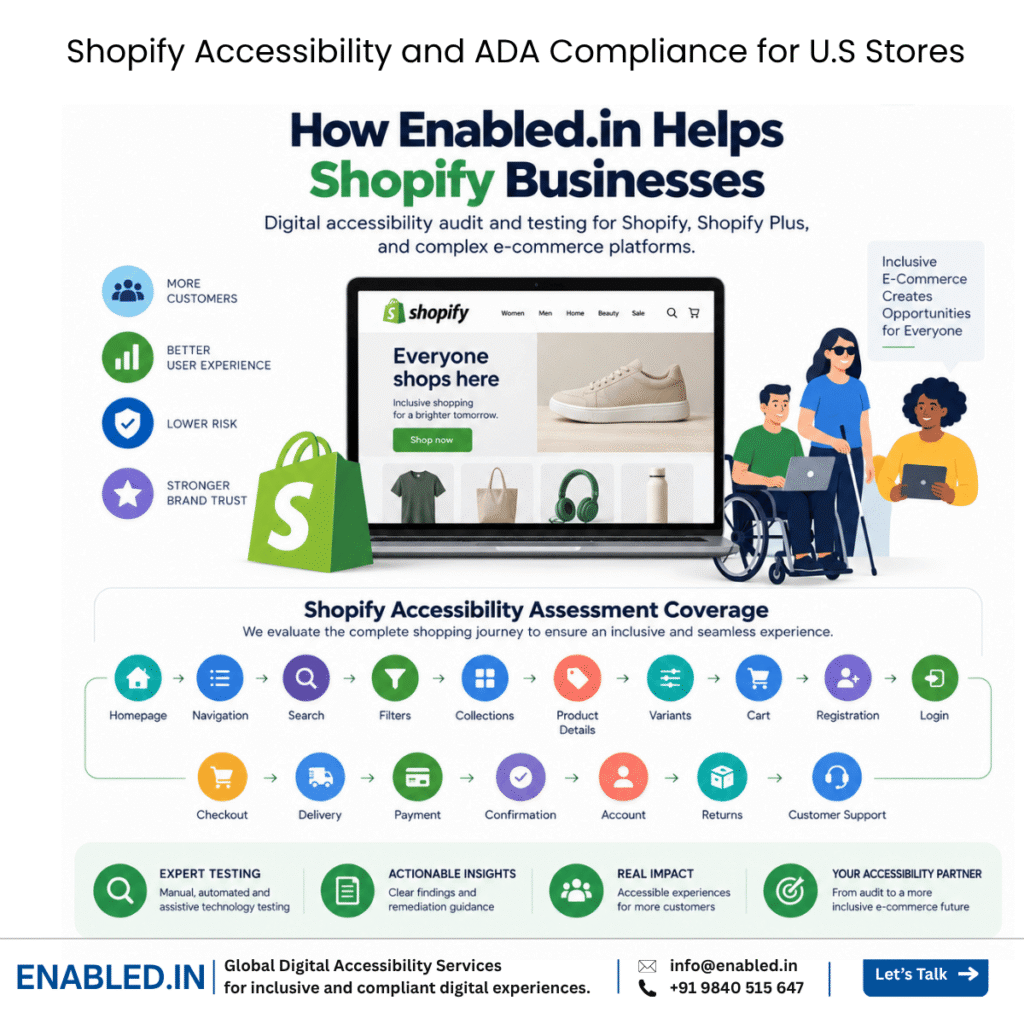
Enabled.in provides digital accessibility audit and testing services for Shopify, Shopify Plus, and complex e-commerce platforms.
We focus on whether customers with disabilities can successfully complete real shopping journeys not simply whether an automated scanner produces a high score.
Shopify Accessibility Assessment Coverage
Your assessment can cover:
Homepage → Navigation → Search → Filters → Collections → Product Details → Variants → Cart → Registration → Login → Checkout → Delivery → Payment → Confirmation → Account → Returns → Customer Support
Depending on the project scope, testing can combine:
Automated Testing + Expert Manual Testing + Keyboard Testing + Assistive Technology Testing + Mobile Accessibility Testing + Real-User Testing with Persons with Disabilities
Services can include:
- WCAG 2.2 AA accessibility audit
- Shopify storefront accessibility testing
- Shopify theme accessibility review
- Keyboard testing
- Screen-reader testing
- Mobile accessibility testing
- Third-party Shopify app assessment
- Checkout accessibility testing
- Payment journey testing
- Developer remediation guidance
- Accessibility issue reporting
- Re-testing and remediation validation
- Accessibility conformance documentation
- VPAT/ACR support where applicable to the product and procurement requirement
Why Enabled.in?
Accessibility testing requires both technical knowledge and an understanding of how people with disabilities actually interact with digital products.
Enabled.in brings accessibility testing experience across:
E-Commerce + SaaS + Banking & FinTech + Enterprise Applications + ERP + Education + Healthcare + Web + Mobile
Testing can include assistive technologies and interaction methods such as:
- NVDA
- JAWS
- VoiceOver
- TalkBack
- Keyboard-only navigation
- Screen magnification
- Voice access
Our objective is not simply to deliver an issue list.
We help teams:
Identify Barriers → Understand User Impact → Remediate → Re-Test → Improve Accessibility
Assess Your Shopify Store for Accessibility
Selling to customers in the United States?
Find out whether accessibility barriers are affecting your Shopify customer journey.
Enabled.in can evaluate your Shopify storefront against WCAG 2.2 Level AA, covering critical experiences from product discovery through cart, checkout, payment, and post-purchase support.
Start with your Shopify store URL.
Share your store URL with us. We can help identify the important customer journeys, third-party components, and appropriate accessibility testing scope.
Enabled.in – Digital Accessibility Services
Email: info@enabled.in
Phone: +91 98405 15647
Service: Shopify Accessibility Audit & Testing
Technical Benchmark: WCAG 2.2 Level AA
Market: United States and Global
Platforms: Shopify and Shopify Plus
Frequently Asked Questions
Is Shopify ADA compliant?
Shopify provides accessibility features, resources, and accessibility work across its platform, but this does not automatically establish that every merchant’s Shopify store is accessible or ADA compliant. Themes, merchant content, customizations, apps, and integrations affect the final customer experience.
Does the ADA apply to Shopify websites?
The U.S. Department of Justice states that businesses open to the public must ensure that people with disabilities can access the goods and services they offer through websites. Whether and how the ADA applies to a particular organization depends on its circumstances.
Does WCAG 2.2 AA guarantee ADA compliance?
No. WCAG 2.2 AA is a technical accessibility standard, while the ADA is U.S. civil rights law. WCAG provides a structured benchmark for evaluating and improving digital accessibility, but “WCAG conformance” and “ADA compliance” should not be treated as legally interchangeable terms.
What WCAG version should Shopify stores use?
For a new accessibility assessment, WCAG 2.2 Level AA is a strong current technical benchmark. W3C encourages organizations to use the latest version of WCAG.
Does an accessible Shopify theme make my entire store accessible?
No. Theme accessibility is only one part of the final customer experience. Content, custom code, apps, integrations, checkout configuration, and future changes can introduce accessibility barriers.
Can automated tools test Shopify accessibility?
Automated tools can identify some accessibility issues but cannot fully evaluate complex customer interactions. Manual, keyboard, and assistive technology testing are important for assessing complete shopping journeys.
Do Shopify apps need accessibility testing?
Customer-facing Shopify apps should be considered when they affect important user journeys. Filters, reviews, subscriptions, chat, pop-ups, loyalty programs, search tools, and payment components can introduce accessibility barriers.
Should Shopify checkout be accessibility tested?
Yes. Checkout is a critical purchasing journey. Testing should consider forms, validation, delivery options, discounts, keyboard interaction, payment selection, error recovery, order submission, and confirmation.
Can Enabled.in test Shopify stores against WCAG 2.2 AA?
Yes. Enabled.in provides Shopify accessibility assessments that can combine automated, expert manual, keyboard, screen-reader, mobile, and real-user testing, followed by remediation guidance and re-testing.
Discover more from Enabled.in
Subscribe to get the latest posts sent to your email.